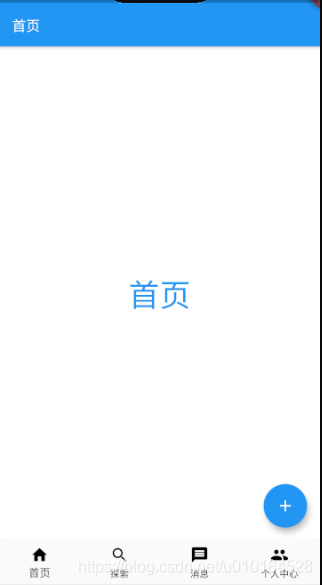
Step 1:新建工程,添加导航栏
import 'package:flutter/cupertino.dart';
import 'package:flutter/material.dart';void main(){runApp(MyApp());
}class MyApp extends StatefulWidget{@overrideState<StatefulWidget> createState() {return AppWidget();}
}
class AppWidget extends State{@overrideWidget build(BuildContext context) {return MaterialApp(home: Scaffold(appBar: AppBar(backgroundColor: Colors.blue,title: Text('首页',style: TextStyle(color: Colors.white,fontSize: 18,),),),),);}
}
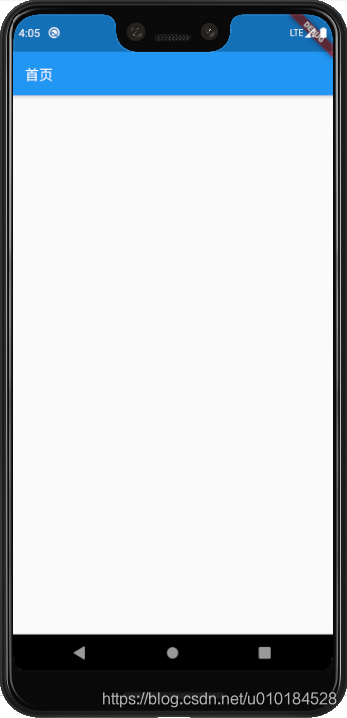
Step 2:添加悬浮按钮FloatingActionButton
floatingActionButton: FloatingActionButton(child: Icon(Icons.add),backgroundColor: Colors.blue,
),
Step 3:添加底部导航BottomNavigationBar
items BottomNavigationBarItem类型的List 底部导航栏的显示项 onTap ValueChanged < int > 点击导航栏子项时的回调 currentIndex 当前显示项的下标 fixedColor 底部导航栏type为fixed时导航栏的颜色,如果为空的话默认使用ThemeData.primaryColor iconSize BottomNavigationBarItem icon的大小 type 有fixed和shifting两个类型,显示效果不一样
BottomNavigationBarType.shiftingBottomNavigationBarType.fixed
bottomNavigationBar: BottomNavigationBar(fixedColor: Colors.blue,currentIndex: _selectedIndex,onTap: _onItemTapped,items: <BottomNavigationBarItem>[BottomNavigationBarItem(icon:Icon(Icons.home,color: Colors.black,),title: Text('首页',style: TextStyle(color: Colors.black),)),BottomNavigationBarItem(icon:Icon(Icons.search,color: Colors.black,),title: Text('探索',style: TextStyle(color: Colors.black),)),BottomNavigationBarItem(icon:Icon(Icons.message,color: Colors.black,),title: Text('消息',style: TextStyle(color: Colors.black),)),BottomNavigationBarItem(icon:Icon(Icons.people,color: Colors.black,),title: Text('个人中心',style: TextStyle(color: Colors.black),)),],
)

Step4:创建4个Tab页
class TabOne extends StatelessWidget{@overrideWidget build(BuildContext context) {return Center(child: Text('首页',style: TextStyle(fontSize: 40,color: Colors.blue),),);}
}
全部代码
import 'package:flutter/cupertino.dart';
import 'package:flutter/material.dart';void main(){runApp(MyApp());
}class MyApp extends StatefulWidget{@overrideState<StatefulWidget> createState() {return AppWidget();}
}class AppWidget extends State{var pages = [TabOne(),TabTwo(),TabThree(),TabFour()];int _selectedIndex = 0;@overrideWidget build(BuildContext context) {return MaterialApp(home: Scaffold(backgroundColor: Colors.white,appBar: AppBar(backgroundColor: Colors.blue,title: Text('首页',style: TextStyle(color: Colors.white,fontSize: 18,),),),floatingActionButton: FloatingActionButton(child: Icon(Icons.add),backgroundColor: Colors.blue,),bottomNavigationBar: BottomNavigationBar(type: BottomNavigationBarType.fixed,fixedColor: Colors.blue,currentIndex: _selectedIndex,onTap: _onItemTapped,items: <BottomNavigationBarItem>[BottomNavigationBarItem(icon:Icon(Icons.home,color: Colors.black,),title: Text('首页',style: TextStyle(color: Colors.black),)),BottomNavigationBarItem(icon:Icon(Icons.search,color: Colors.black,),title: Text('探索',style: TextStyle(color: Colors.black),)),BottomNavigationBarItem(icon:Icon(Icons.message,color: Colors.black,),title: Text('消息',style: TextStyle(color: Colors.black),)),BottomNavigationBarItem(icon:Icon(Icons.people,color: Colors.black,),title: Text('个人中心',style: TextStyle(color: Colors.black),)),],),body: pages[_selectedIndex],),);}void _onItemTapped(int index) {setState(() {_selectedIndex = index;});}}class TabOne extends StatelessWidget{@overrideWidget build(BuildContext context) {return Center(child: Text('首页',style: TextStyle(fontSize: 40,color: Colors.blue),),);}
}class TabTwo extends StatelessWidget{@overrideWidget build(BuildContext context) {return Center(child: Text('探索',style: TextStyle(fontSize: 40,color: Colors.blue),),);}
}class TabThree extends StatelessWidget{@overrideWidget build(BuildContext context) {return Center(child: Text('消息',style: TextStyle(fontSize: 40,color: Colors.blue),),);}
}class TabFour extends StatelessWidget{@overrideWidget build(BuildContext context) {return Center(child: Text('我的',style: TextStyle(fontSize: 40,color: Colors.blue),),);}
}