
显示效果
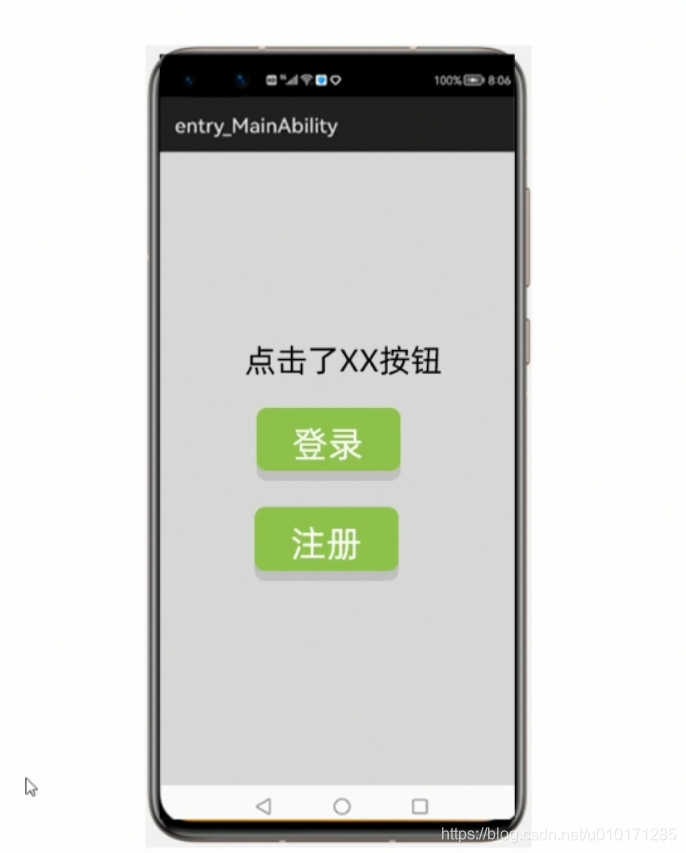
代码示例
ability_main.xml
<?xml version="1.0" encoding="utf-8"?>
<DirectionalLayoutxmlns:ohos="http://schemas.huawei.com/res/ohos"ohos:height="match_parent"ohos:width="match_parent"ohos:alignment="center"ohos:orientation="vertical"><Textohos:id="$+id:text1"ohos:height="match_content"ohos:width="match_content"ohos:text="Text"ohos:text_size="100"/><Buttonohos:id="$+id:register"ohos:height="match_content"ohos:width="match_content"ohos:text="注册"ohos:text_size="100"ohos:background_element="red"/></DirectionalLayout>
MainAbilitySlice.java
package com.example.myapplication.slice;import com.example.myapplication.ResourceTable;
import ohos.aafwk.ability.AbilitySlice;
import ohos.aafwk.ability.OnClickListener;
import ohos.aafwk.content.Intent;
import ohos.aafwk.content.Operation;
import ohos.agp.components.Button;
import ohos.agp.components.Component;
import ohos.agp.components.DirectionalLayout;
import ohos.agp.components.Text;
import ohos.javax.xml.stream.events.EndElement;
import ohos.multimodalinput.event.MmiPoint;
import ohos.multimodalinput.event.TouchEvent;public class MainAbilitySlice extends AbilitySlice implements Component.ClickedListener {Text text1;Button login;Button register;@Overridepublic void onStart(Intent intent) {super.onStart(intent);super.setUIContent(ResourceTable.Layout_ability_main);//1. 找到文本框和按钮组件text1 = (Text) findComponentById(ResourceTable.Id_text1);login = (Button) findComponentById(ResourceTable.Id_login);register = (Button) findComponentById(ResourceTable.Id_register);//2. 给按钮绑定事件//要对登录,注册按钮做点击事件login.setClickedListener(this);register.setClickedListener(this);}@Overridepublic void onActive() {super.onActive();}@Overridepublic void onForeground(Intent intent) {super.onForeground(intent);}@Overridepublic void onClick(Component component) {//现在需要判断当前的按钮是登录按钮还是注册按钮if(component == login){   //表示点击了登录按钮text1.setText("点击了登录按钮");}else if (component == register){text1.setText("点击了注册按钮");}}
}