
可以参考:
ESC/P 打印指令使用,3种票据打印方法 https://blog.csdn.net/pfworld/article/details/2084666
Android 蓝牙连接 ESC/POS 热敏打印机打印(ESC/POS指令篇)https://www.jianshu.com/p/c0b6d1a4823b
ESC/POS指令集在android设备上使用实例(通过socket) https://www.cnblogs.com/kunyashaw/p/4314383.html
ESC/POS指令开发入门 https://download.csdn.net/download/shyyl/2004198
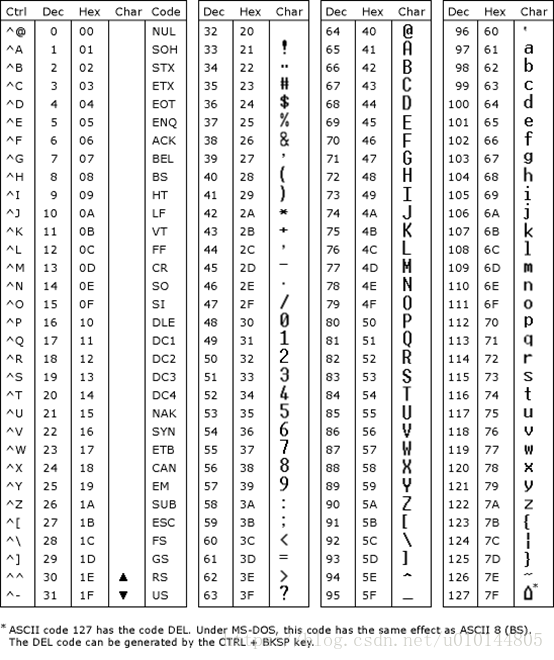
码表
PrinterCmdUtils.java
打印的工具类,注释中详细说明了每个指令对应的ESC编码和功能
import java.io.IOException;
import java.io.UnsupportedEncodingException;import android.graphics.Bitmap;
import android.graphics.Canvas;
import android.graphics.Rect;//
public class PrinterCmdUtils {// ------------------------------------------一位命令-----------------------------------------------------private static final byte DATA_ESC = 0x1B; // 【ESC】private static final byte DATA_GS = 0x1D; // 【GS】private static final byte DATA_LF = 0x0A; // 【LF】打印并走纸一行line feed, new lineprivate static final byte DATA_HT = 0x09; // 【HT】横向跳格private static final byte DATA_FF = 0x0C; // 【FF】打印并回到标准模式(在页模式下)或打印并将标签进纸到打印起始位置private static final byte DATA_CR = 0x0D; // 【CR】打印并回车private static final byte DATA_CAN = 0x18; // 【CAN】页模式下删除打印缓冲区内容// ------------------------------------------二位命令-----------------------------------------------------// 【ESC FF】 页模式下打印// 【ESC 2】 设置默认行高(默认行间距)private static final byte DATA_ESC_2 = 0x32;// 【ESC @】 初始化打印机private static final byte DATA_ESC_INIT = 0x40; // 【@】ESC @ (initialize printer)// 【ESC L】 选择页模式private static final byte DATA_L = 0x4C;// 【ESC S】 选择标准模式private static final byte DATA_S = 0x53;// 【GS FF】 将标记打印纸打印到起始位置// 【GS :】 开始/结束宏定义private static final byte DATA_MAOHAO = 0x3A; // 【:】// 【FS &】 设定汉字模式// 【FS .】 取消汉字字符private static final byte DATA_DIAN = 0x2E; // 【.】// ------------------------------------------三位命令-----------------------------------------------------// 【GS G n】 设置打印浓度// 【ESC SP n】设置字符右间距(即字符间距)private static final byte DATA_SP = 0x20; // 【SP】/*** 【ESC ! n】 选择打印模式 设置字型(ESC M n),加粗(ESC E n),倍高倍宽(GS ! n),下划线(ESC - n)*/// 【GS ! n】 选择字符放大倍数private static final byte DATA_PRINTMODE = 0x21; // 【!】// 【DLE EOT n】 实时状态传送private static final byte DATA_DLE = 0x10; // 【DLE】private static final byte DATA_EOT = 0x04; // 【EOT】// 【ESC % n】 选择/取消自定义字符private static final byte DATA_BAIFEN = 0x25; // 【%】// 【ESC - n】 选择/取消下划线模式private static final byte DATA_ESC_UNDERLINE = 0x2D; // 【-】ESC - n (turn underline mode on/off ---- 0or48: off,// 1or49: on & 1-dot witdh, 2or50: on & 2-dot witdh)// 【ESC 3 n】 设置行高(行间距)private static final byte DATA_ESC_3 = 0x33;// 【ESC c 3 n】未使用命令private static final byte DATA_ESC_c_3 = 0x33; // ESC c 3 n (Select page sensors to output pager-end signal)// 【ESC ? n】 取消用户自定义字符private static final byte DATA_WEN = 0x3F; // 【?】// 【ESC E n】 选择/取消加粗模式private static final byte DATA_ESC_E = 0x45; // ESC E n (turn emphasized mode on-1/off-0)// 【ESC G n】 选择/取消双重打印模式private static final byte DATA_ESC_G = 0x47; // 【G】ESC G n (turn double-strike mode on-1/off-0)// 【ESC a n】 选择对齐方式private static final byte DATA_ESC_a = 0x61; // 【a】ESC a n (select align justification --- default: 0, 0or48: Left,// 1or49: Center, 2or50: Rigth)// 【ESC J n】 打印并走纸private static final byte DATA_J = 0x4A;// 【ESC M n】 选择字体private static final byte DATA_ESC_M = 0x4D; // ESC M n (select character font --- default: 0, 0or48: font A, 1or49:// font B, 2or50: font C)// 【ESC T n】 在页模式下选择打印区域方向private static final byte DATA_T = 0x54;// 【ESC V n】 设置/解除顺时针旋转 90°// 【GS V m】【GS V m n】 选择裁纸模式并裁纸private static final byte DATA_GS_V = 0x56; // 【V】GS V m (select cut mode and cut paper)// 【ESC d n】 打印并向前走纸 n 行private static final byte DATA_ESC_d = 0x64; // 【d】ESC d n (print and feed n lines)// 【ESC t n】 设置代码页private static final byte DATA_ESC_t = 0x74; // 【t】ESC t n (select character code table)// 【ESC { n】 选择/取消倒置打印模式private static final byte DATA_ZUOKUO = 0x7B; // 【{】// GS / m 打印下载位图private static final byte DATA_XIE = 0x2F; // 【/】// 【GS B n】 选择 / 取消黑白反显打印模式private static final byte DATA_GS_B = 0x42; // 【B】GS B n (turn white/black reverse printing mode on-1/off-0)// 【GS f n】 选择 HRI(Human Readable Interpretation) 字符字型private static final byte DATA_f = 0x66; // 【f】// 【GS H n】 选择 HRI 字符的打印位置private static final byte DATA_H = 0x48; // 【H】// 【GS I n】 传送打印机 IDprivate static final byte DATA_I = 0x49; // 【I】// 【GS T n】 设置打印位置为打印行起点// 【GS a n】 允许/禁止自动回复状态(ASB)// 【GS h n】 选择条码高度private static final byte DATA_GS_h = 0x68; // 【h】GS h n (select bar code height: default n=162, 1 <= n <= 255)// 【GS w n】 设置条形码宽度// 【FS ! n】 设置汉字字符打印模式组合// 【FS - n】 设置/取消汉字字符下划线模式// 【FS W n】 设置/解除四倍角中文打印// 【1B 1B 91】 获取切刀模式// 【ESC ESC p】 检查打印机是否处于空闲状态// 【ESC ESC q】 检查打印机缓存是否有数据// ------------------------------------------四位命令-----------------------------------------------------// 【GS F nL nH】 设置串口private static final byte DATA_F = 0x46;// 【ESC $ nL nH】 设置横向绝对打印位置private static final byte DATA_$ = 0x24; // 【$】// 【ESC D n1...nk NUL】 设置横向跳格位置private static final byte DATA_D = 0x44;// 【ESC \ nL nH】 设置相对打印位置private static final byte DATA_FANXIE = 0x5C; // 【\】// 【ESC c 5 n】 激活/禁止面板按键private static final byte DATA_ESC_c = 0x63;private static final byte DATA_ESC_c_5 = 0x35; // ESC c 5 n// 【FS p n m】 打印下载到 NV 存储器中的位图private static final byte DATA_FS = 0x1C; // 【FS】private static final byte DATA_FS_p = 0x70;// 【GS $ nL nH】 页模式下设置纵向绝对位置// 【GS L nL nH】 设置左边距// 【GS W nL nH】 设置打印区域宽度private static final byte DATA_W = 0x49; // 【W】// 【GS \ nL nH】 页模式下设置相对垂直打印位置// 【1B 1B 90 n】 设置黑标模式// ------------------------------------------五位命令-----------------------------------------------------// 【GS ^ r t m】 运行宏private static final byte DATA_JIAN = 0x5E; // 【^】// 【FS 2 c1 c2 d1...dk】 定义用户自定义汉字字符 32//【2】// 【GS k m d1...dk NUL】【GS k m n d1...dn】打印条码// ------------------------------------------其他命令-----------------------------------------------------// ESC & y c1 c2 [x1 d1...d(y × x1)]...[xk d1...d(y × xk)]定义用户自定义字符private static final byte DATA_AND = 0x26; // 【&】// ESC * m nL nH d1... dk 选择位图模式private static final byte DATA_XINHAO = 0x2A; // 【*】// ESC W xL xH yL yH dxL dyL dyH 在页模式下设置打印区域// FS q n [xL xH yL yH d1...dk]1...[xL xH yL yH d1...dk]n 定义 NV 位图// <功能 065> GS ( k pL pH cn fn n (cn = 48, fn = 65) 设置打印数据区域的列数private static final byte DATA_GS_k = 0x6B; // 【k】// ------------------------------------------PDF417条形码-------------------------------------------------// <功能 066> GS ( k pL pH cn fn n (cn = 48, fn = 66) 设置行数// <功能 067> GS ( k pL pH cn fn n (cn = 48, fn = 67) 设置模块宽度// <功能 068> GS ( k pL pH cn fn n (cn = 48, fn = 68) 设置行高// <功能 069> GS ( k pL pH cn fn m n (cn = 48, fn = 69) 设置纠错等级// <功能 070> GS ( k pL pH cn fn m (cn = 48, fn = 70) 选择可选项// <功能 080> GS ( k pL pH cn fn m d1...dk (cn = 48, fn = 80) 存储数据到符号存储区// <功能 081> GS ( k pL pH cn fn m (cn = 48, fn = 81) 打印在符号存贮区的符号数据// <功能 082> GS ( k pL pH cn fn m (cn = 48, fn = 82) 传送在符号存贮区的符号数据的大小信息// GS * x y d1...d(x × y × 8) 定义下传位图// GS v 0 m xL xH yL yH d1....dk 打印光栅位图// ----------------------------------------------------------------------------------------------------public static final byte ESC = 27;// 换码public static final byte FS = 28;// 文本分隔符public static final byte GS = 29;// 组分隔符public static final byte DLE = 16;// 数据连接换码public static final byte EOT = 4;// 传输结束public static final byte ENQ = 5;// 询问字符public static final byte SP = 32;// 空格public static final byte HT = 9;// 横向列表public static final byte LF = 10;// 打印并换行(水平定位)public static final byte CR = 13;// 归位键public static final byte FF = 12;// 走纸控制(打印并回到标准模式(在页模式下) )public static final byte CAN = 24;// 作废(页模式下取消打印数据 )// --------------------FEED 键、 BOOT 键指令------------------------/*** 【GS G n】 设置打印浓度 灰度 第5位为1 ,默认开启纸将尽传感器 0010 1100 轻度 44 0010 0000 正常浓度 32 0010* 1000 稍深 40 0010 0100 深度 36*/public static byte[] printer_gray(int gray) {byte[] result = new byte[3];result[0] = GS;result[1] = DATA_ESC_G;switch (gray) {case 1:result[2] = (byte) 44;break;case 2:result[2] = (byte) 32;break;case 3:result[2] = (byte) 40;break;case 4:result[2] = (byte) 36;break;}return result;}// ------------------------打印机初始化-----------------------------/*** 打印机初始化 【ESC @】 初始化打印机*/public static byte[] init_printer() {byte[] result = new byte[2];result[0] = DATA_ESC;// 0x1B ESCresult[1] = DATA_ESC_INIT;// 0x40 64;return result;}// ------------------------打印机状态-----------------------------/*** 【DLE EOT n】 实时状态传送 实时地传送打印机状态。 参数 n 用来指定所要传送的打印机状态, 定义如下: n = 1: 传输打印机状态 n =* 2: 传输脱机状态 n = 3: 传输错误状态 n = 4: 传输卷纸传感器状态*/public static byte[] printer_status(int n) {byte[] result = new byte[3];result[0] = DATA_DLE;// 0x10 【DLE】result[1] = DATA_EOT;// 0x04 【EOT】result[2] = (byte) n;return result;}// ------------------------打印文本-----------------------------public static byte[] printText(String text) {byte[] result = null;try {result = text.getBytes("GBK");} catch (UnsupportedEncodingException e) {e.printStackTrace();}return result;}// ------------------------换行-----------------------------/*** 换行 【LF】打印并走纸* * @param lineNum要换几行*/public static byte[] nextLine(int lineNum) {byte[] result = new byte[lineNum];for (int i = 0; i < lineNum; i++) {result[i] = DATA_LF;// 0x0A LF}return result;}/*** 【ESC J n】 打印并走纸 打印缓冲区数据并走纸[n × 0.125mm]* * @param lineNum要换几行* @return*/public static byte[] nextLines(int lineNum) {byte[] result = new byte[3];result[0] = DATA_ESC;// 0x1B ESCresult[1] = DATA_J;// 0x4Aresult[2] = (byte) lineNum;return result;}/*** 【ESC d n】 打印并向前走纸 n 行 打印缓存区里的数据并向前走纸 n 行(字符行)* * @param lineNum要换几行* @return*/public static byte[] nextLines2(int lineNum) {byte[] result = new byte[3];result[0] = DATA_ESC;// 0x1B ESCresult[1] = DATA_ESC_d;// 0x64;result[2] = (byte) lineNum;return result;}// ------------------------制表-----------------------------/*** 制表* * @param length要几个表格* @return*/public static byte[] printTab(int length) {byte[] result = new byte[length];for (int i = 0; i < length; i++) {result[i] = HT; // "\t";}return result;}// --------------------------打印模式------------------------------/*** 【ESC ! n】 选择打印模式 设置字型(ESC M n),加粗(ESC E n),倍高倍宽(GS ! n),下划线(ESC - n)*//*** 【FS ! n】 设置汉字字符打印模式组合 禁止或允许 倍高倍宽,下划线* 0000 0100允许倍宽 4* 0000 1000允许倍高 8* 1000 0000允许下划线模式 128*/public static byte[] chinese_charmode(int mode) {byte[] result = new byte[3];result[0] = FS;result[1] = DATA_PRINTMODE;result[2] = (byte)mode;//128下划线,12放大return result;}/*** 【FS &】 设定汉字模式*/// ------------------------下划线-----------------------------/*** 绘制下划线(1点宽) 【ESC - n】 选择/取消下划线模式 可以使用【ESC ! n】【FS ! n】【FS - n】设置或取消下划线模式,* 并且以最后收到的命令为有效*/public static byte[] underlineWithOneDotWidthOn() {byte[] result = new byte[3];result[0] = ESC;result[1] = 45;// 0x2Dresult[2] = 1;return result;}/*** 绘制下划线(2点宽) 【ESC - n】 选择/取消下划线模式* * @return*/public static byte[] underlineWithTwoDotWidthOn() {byte[] result = new byte[3];result[0] = ESC;result[1] = 45;result[2] = 2;return result;}/*** 取消绘制下划线 【ESC - n】 选择/取消下划线模式* * @return*/public static byte[] underlineOff() {byte[] result = new byte[3];result[0] = ESC;result[1] = 45;result[2] = 0;return result;}// ------------------------加粗-----------------------------/*** 选择加粗模式 【ESC E n】 选择/取消加粗模式*/public static byte[] boldOn() {byte[] result = new byte[3];result[0] = ESC;result[1] = DATA_ESC_E;// 69;result[2] = 0xF;return result;}/*** 取消加粗模式 【ESC E n】 选择/取消加粗模式*/public static byte[] boldOff() {byte[] result = new byte[3];result[0] = ESC;result[1] = DATA_ESC_E;// 69;result[2] = 0;return result;}// ------------------------对齐-----------------------------/*** 左对齐* * @return*/public static byte[] alignLeft() {byte[] result = new byte[3];result[0] = ESC;result[1] = 97;result[2] = 0;return result;}/*** 居中对齐* * @return*/public static byte[] alignCenter() {byte[] result = new byte[3];result[0] = ESC;result[1] = 97;result[2] = 1;return result;}/*** 右对齐* * @return*/public static byte[] alignRight() {byte[] result = new byte[3];result[0] = ESC;result[1] = 97;result[2] = 2;return result;}/*** 设置文本对齐方式,或设置条码对齐方式* * @param align*            打印位置 0:居左(默认) 1:居中 2:居右* @throws IOException*/public static byte[] setAlignPosition(int align) {byte[] result = new byte[3];result[0] = DATA_ESC;// 0x1B ESC;result[1] = DATA_ESC_a;// 0x61 97result[2] = (byte) align;return result;}/*** 水平方向向右移动col列* * @param col* @return*/public static byte[] set_HT_position(byte col) {byte[] result = new byte[4];result[0] = ESC;result[1] = 68;result[2] = col;result[3] = 0;return result;}// ------------------------字体大小-----------------------------/*** 【GS ! n】 选择字符放大倍数 用n的0到3位选择字符高度, 4到7位选择字符宽度 【ESC ! n】也能设置字符大小, 最后被执行的指令有效*/public static byte[] fontSizeSet(int n) {byte[] result = new byte[3];result[0] = GS;result[1] = DATA_PRINTMODE;// 0x21 【!】result[2] = (byte) n;return result;}/*** 字体变大为标准的n倍* * @param num* @return*/public static byte[] fontSizeSetBig(int num) {byte realSize = 0;switch (num) {case 1:realSize = 0;break;case 2:realSize = 17;break;case 3:realSize = 34;break;case 4:realSize = 51;break;case 5:realSize = 68;break;case 6:realSize = 85;break;case 7:realSize = 102;break;case 8:realSize = 119;break;}byte[] result = new byte[3];result[0] = 29;result[1] = 33;result[2] = realSize;return result;}/*** 字体取消倍宽倍高* * @param num* @return*/public static byte[] fontSizeSetSmall(int num) {byte[] result = new byte[3];result[0] = ESC;result[1] = 33;return result;}// ------------------------设置左边距---------------------------/*** 【GS L nL nH】 设置左边距 用nL 和 nH设定左边空白量,左边空白量设置为[(nL+nH×256)×0.125毫米]*/public static byte[] setMarginLeft(int nL, int nH) {byte[] result = new byte[4];result[0] = GS;result[1] = DATA_L;// 0x4C 【L】result[2] = (byte) nL;result[3] = (byte) nH;return result;}// ------------------------设置字符间距---------------------------/*** 设置字符右间距ESC SP n 该命令不影响汉字字符的设定*/public static byte[] setWordGap(int gap) {byte[] result = new byte[3];result[0] = DATA_ESC;result[1] = DATA_SP;// 0x20result[2] = (byte) gap;return result;}// ------------------------设置行间距---------------------------/*** 【ESC 2】 设置默认行高* */public static byte[] setDefaultLineGap(int gap) {byte[] result = new byte[2];result[0] = DATA_ESC;// 0x1Bresult[1] = DATA_ESC_2;// 0x32return result;}/*** 【ESC 3 n】 设置行高--行间距 设置行间距为 [ n × 0.125mm]*/public static byte[] setLineGap(int gap) {byte[] result = new byte[3];result[0] = DATA_ESC;// 0x1Bresult[1] = DATA_ESC_3;// 0x33result[2] = (byte) gap;return result;}// ------------------------选择页模式或标准模式---------------------------/*** 【ESC L】 选择页模式 从标准模式转换到页模式,该指令只在标准模式的行首有效 当执行 FF 或 ESC S 后, 打印机返回到标准模式* 将下列指令的设置转换到页模式下的值: ①设置字符右间距: ESC SP ②设置行间距: ESC 2, ESC 3*//*** 【ESC S】 选择标准模式* */// 【ESC T n】 在页模式下选择打印区域方向// ------------------------打印位图---------------------------/*** ESC * m nL nH d1... dk 选择位图模式*/public static byte[] chooseBitmap(int m) {// TODOreturn null;}/*** FS q n [xL xH yL yH d1...dk]1...[xL xH yL yH d1...dk]n 定义 NV 位图* */public static byte[] defineBitmap(int m) {// TODOreturn null;}/*** GS / m 打印下载位图 打印一幅下载位图, 打印模式由m指定 m 模式 纵向分辨率(DPI) 横向分辨率(DPI) 0,48 正常 203.2* 203.2 1,49 倍宽 203.2 101.6 2,50 倍高 101.6 203.2 3,51 倍宽倍高 101.6 101.6*/public static byte[] printBitmap(int m) {byte[] result = new byte[3];result[0] = GS;result[1] = DATA_XIE;result[2] = (byte) m;return result;}/*** 【FS p n m】 打印下载到 NV 存储器中的位图 n表示位图(由指令FS q定义) 的图号 以m指定的模式打印下载到NV存储器中的位图 m 模式* 纵向分辨率(DPI) 横向分辨率(DPI) 0,48 正常 203.2 203.2 1,49 倍宽 203.2 101.6 2,50 倍高 101.6* 203.2 3,51 倍宽倍高 101.6 101.6*/public static byte[] printBitmap(int n, int m) {byte[] result = new byte[4];result[0] = DATA_FS;result[1] = DATA_FS_p;result[2] = (byte) n;result[3] = (byte) m;return result;}// ------------------------设置打印区域---------------------------// 设置打印区域宽度GS W nL nH// 用nL 和 nH设定打印区域宽度,打印区域宽度设置为[(nL+nH×256)×0.125毫米]public static byte[] setPrintAreaWidth(int nL, int nH) {byte[] result = new byte[4];result[0] = DATA_GS;result[1] = DATA_W;result[2] = (byte) nL;result[3] = (byte) nH;return result;}// ------------------------条形码---------------------------// 设置条码的位置--与设置文本对齐方式相同// 设置条码的宽度GS w npublic static byte[] setBarCodeWith(int width) {byte[] result = new byte[3];result[0] = DATA_GS;// 0x1Dresult[1] = DATA_W;// 'W'result[2] = (byte) width;return result;}// 设置条码的高度GS h npublic static byte[] setBarCodeHeight(int height) {byte[] result = new byte[3];result[0] = DATA_GS;result[1] = DATA_GS_h;result[2] = (byte) height;return result;}// 条码注释打印在条码位置GS H n// 打印条码时, 为HRI字符选择打印位置(HRI 是对条码内容注释的字符)// 0, 48 不打印;1, 49 在条码上方;2, 50 在条码下方;3, 51 在条码上方及下方public static byte[] setHRILocation(int loc) {byte[] result = new byte[3];result[0] = DATA_GS;result[1] = DATA_H;result[2] = (byte) loc;return result;}/*** 选定条形码系统(m值)并打印条码* * 【GS k m d1...dk NUL】 该命令在这种格式下以 NUL 结束 0 UPC-A 11 ≤ k ≤ 12 48 ≤ d ≤ 57 1* UPC-E 11 ≤ k ≤ 12 48 ≤ d ≤ 57 2 JAN13 (EAN13) 12 ≤ k ≤ 13 48 ≤ d ≤ 57 3 JAN 8* (EAN8) 7 ≤ k ≤ 8 48 ≤ d ≤ 57 4 CODE39 1 ≤ k 48 ≤ d ≤ 57, 65 ≤ d ≤ 90, 32, 36,* 37, 43, 45, 46, 47 5 ITF 1 ≤ k (偶数) 48 ≤ d ≤ 57 6 CODABAR 1 ≤ k 48 ≤ d ≤ 57,* 65 ≤ d ≤ 68, 36, 43, 45, 46, 47, 58* * 【GS k m n d1...dn】 n用来指示条码数据的个数, 打印机将其后边 n 字节数据作为条码数据处理 65 UPC-A 11 ≤ n ≤ 12* 48 ≤ d ≤ 57 66 UPC-E 11 ≤ n ≤ 12 48 ≤ d ≤ 57 67 JAN13 (EAN13) 12 ≤ n ≤ 13 48* ≤ d ≤ 57 68 JAN 8 (EAN8) 7 ≤ n ≤ 8 48 ≤ d ≤ 57 69 CODE39 1 ≤ n ≤ 255 48 ≤ d ≤* 57, 65 ≤ d ≤ 90, 32, 36, 37, 43, 45, 46, 47 70 ITF 1 ≤ n ≤ 255(偶数) 48 ≤ d ≤* 57 71 CODABAR 1 ≤ n ≤ 255 48 ≤ d ≤ 57, 65 ≤ d ≤ 68, 36, 43, 45, 46, 47, 58 72* CODE93 1 ≤ n ≤ 255 0 ≤ d ≤ 127 [实例] 打印 GS k 72 7 67 111 100 101 13 57 51 73* CODE128 2 ≤ n ≤ 255 0 ≤ d ≤ 127 [实例] 打印"No. 123456"的实例数据,首先用CODE B打印"No."* 然后用CODE C 打印下列数字。GS k 73 10 123 66 78 111 46 123 67 12 34 56*/public static byte[] printBarCode(int m, byte[] dk) {byte[] result = new byte[3 + dk.length];result[0] = DATA_GS;result[1] = DATA_GS_k;result[2] = (byte) m;// 选定条形码系统for (int i = 0; i < dk.length; i++) {result[3 + i] = dk[i];}return result;}public static byte[] printBarCode(int m, int n, byte[] dn) {byte[] result = new byte[4 + n];result[0] = DATA_GS;result[1] = DATA_GS_k;result[2] = (byte) m;// 选定条形码系统result[3] = (byte) n;// 条码数据的个数for (int i = 0; i < n; i++) {result[4 + i] = dn[i];}return result;}// ------------------------切纸-----------------------------/*** 【GS V m】选择裁纸模式并部分裁纸(保留一点不裁)*/public static byte[] feedPaperCutPartial(int m) {byte[] result = new byte[3];result[0] = GS;result[1] = DATA_GS_V;// 86;//0x56result[2] = (byte) m;// 1, 49return result;}/*** 【GS V m n】 选择裁纸模式并进纸(裁纸位置+[n × 0.125 毫米]) , 并且进行部分裁纸(保留一点不裁)* * @return*/public static byte[] feedPaperCutPartial(int m, int n) {byte[] result = new byte[4];result[0] = GS;result[1] = DATA_GS_V;// 86;//0x56result[2] = (byte) 66;// (byte)m;//66result[3] = (byte) n;return result;}/*** 进纸并全部切割* * @return*/public static byte[] feedPaperCutAll() {byte[] result = new byte[4];result[0] = GS;result[1] = DATA_GS_V;// 86;//0x56result[2] = 65;// 0x41result[3] = 0;return result;}/*** 进纸并切割(左边留一点不切)* * @return*/public static byte[] feedPaperCutPartial() {byte[] result = new byte[4];result[0] = GS;result[1] = 86;result[2] = 66;result[3] = 0;return result;}// ------------------------字节码拼接--------------------------public static byte[] byteMerger(byte[] byte_1, byte[] byte_2) {byte[] byte_3 = new byte[byte_1.length + byte_2.length];System.arraycopy(byte_1, 0, byte_3, 0, byte_1.length);System.arraycopy(byte_2, 0, byte_3, byte_1.length, byte_2.length);return byte_3;}public static byte[] byteMerger(byte[][] byteList) {int length = 0;for (int i = 0; i < byteList.length; i++) {length += byteList[i].length;}byte[] result = new byte[length];int index = 0;for (int i = 0; i < byteList.length; i++) {byte[] nowByte = byteList[i];for (int k = 0; k < byteList[i].length; k++) {result[index] = nowByte[k];index++;}}for (int i = 0; i < index; i++) {// CommonUtils.LogWuwei("", "result["+i+"] is "+result[i]);}return result;}// ------------------------图片-----------------------------/** * 对图片进行压缩(去除透明度) * * @param bitmapOrg */public static Bitmap compressPic(Bitmap bitmap) {// 获取这个图片的宽和高int width = bitmap.getWidth();int height = bitmap.getHeight();// 指定调整后的宽度和高度int newWidth = 240;int newHeight = 240;Bitmap targetBmp = Bitmap.createBitmap(newWidth, newHeight, Bitmap.Config.ARGB_8888);Canvas targetCanvas = new Canvas(targetBmp);targetCanvas.drawColor(0xffffffff);targetCanvas.drawBitmap(bitmap, new Rect(0, 0, width, height), new Rect(0, 0, newWidth, newHeight), null);return targetBmp;}/*** * 灰度图片黑白化,黑色是1,白色是0 * * @param x 横坐标 * @param y 纵坐标 * @param bit 位图 * @return*/public static byte px2Byte(int x, int y, Bitmap bit) {if (x < bit.getWidth() && y < bit.getHeight()) {byte b;int pixel = bit.getPixel(x, y);int red = (pixel & 0x00ff0000) >> 16;// 取高两位int green = (pixel & 0x0000ff00) >> 8;// 取中两位int blue = pixel & 0x000000ff;// 取低两位int gray = RGB2Gray(red, green, blue);if (gray < 128) {b = 1;} else {b = 0;}return b;}return 0;}/** * 图片灰度的转化 */private static int RGB2Gray(int r, int g, int b) {int gray = (int) (0.29900 * r + 0.58700 * g + 0.11400 * b);// 灰度转化公式return gray;}/************************************************************************** * 假设一个240*240的图片,分辨率设为24, 共分10行打印 * 每一行,是一个 240*24 的点阵, 每一列有24个点,存储在3个byte里面。* * 每个byte存储8个像素点信息。因为只有黑白两色,所以对应为1的位是黑色,对应为0的位是白色**************************************************************************//** * 把一张Bitmap图片转化为打印机可以打印的字节流 * * @param bmp * @return */public static byte[] draw2PxPoint(Bitmap bmp) {// 用来存储转换后的 bitmap 数据。为什么要再加1000,这是为了应对当图片高度无法 //整除24时的情况。比如bitmap 分辨率为 240 *// 250,占用 7500 byte, //但是实际上要存储11行数据,每一行需要 24 * 240 / 8 =720byte// 的空间。再加上一些指令存储的开销, //所以多申请 1000byte 的空间是稳妥的,不然运行时会抛出数组访问越界的异常。int size = bmp.getWidth() * bmp.getHeight() / 8 + 1000;byte[] data = new byte[size];int k = 0;// 设置行距为0的指令data[k++] = 0x1B;data[k++] = 0x33;data[k++] = 0x00;// 逐行打印for (int j = 0; j < bmp.getHeight() / 24f; j++) {// 打印图片的指令data[k++] = 0x1B;// ESCdata[k++] = 0x2A;// 【*】data[k++] = 33;// 24点双密度/** 横向打印点数由nL和nH决定, 总的点数为 nL + nH × 256 */data[k++] = (byte) (bmp.getWidth() % 256); // nLdata[k++] = (byte) (bmp.getWidth() / 256); // nH// 对于每一行,逐列打印for (int i = 0; i < bmp.getWidth(); i++) {// 每一列24个像素点,分为3个字节存储for (int m = 0; m < 3; m++) {// 每个字节表示8个像素点,0表示白色,1表示黑色for (int n = 0; n < 8; n++) {byte b = px2Byte(i, j * 24 + m * 8 + n, bmp);data[k] += data[k] + b;}k++;}}data[k++] = LF;// 10 换行}return data;}
}