
随时随地技术实战干货,获取项目源码、学习资料,请关注源代码社区公众号(ydmsq666)

Matrix是Android提供的一个矩阵工具类,它本身并不能对图像或组件进行变换,但它可与其他API结合起来控制图形、组件的变换。使用Matrix控制变换的步骤如下:
1、获取Matrix对象,该对象既可新创建,也可直接获取其他对象内封装的Matrix(Transformation对象内部就封装了Matrix)。
2、调用Matrix的方法进行平移、旋转、缩放、倾斜等。
3、将Matrix所做的变换应用到指定图形或组件。
Matrix提供了如下方法来控制变换:
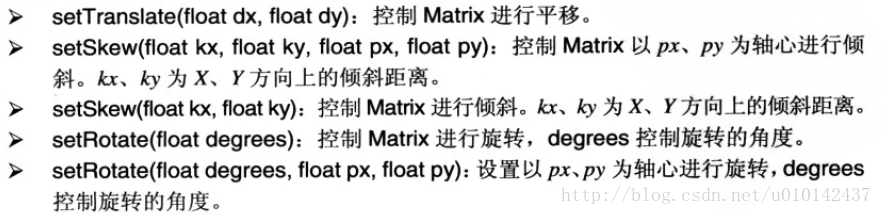

一旦对Matrix进行了变换,然后就可以应用Matrix对图形进行控制了,比如Canvas就提供了一个
drawBitmap(Bitmap bitmap, Matrix matrix, Paint paint)方法。
下面通过一个示例来演示Matrix的使用,代码如下:
Activity:
package com.guyun.activity;import com.guyun.matrixtest.R;import android.os.Bundle;
import android.app.Activity;public class MainActivity extends Activity {@Overrideprotected void onCreate(Bundle savedInstanceState) {super.onCreate(savedInstanceState);setContentView(R.layout.activity_main);}}
View:
package com.guyun.view;import com.guyun.matrixtest.R;import android.content.Context;
import android.graphics.Bitmap;
import android.graphics.BitmapFactory;
import android.graphics.Canvas;
import android.graphics.Matrix;
import android.graphics.Paint;
import android.util.AttributeSet;
import android.view.View;public class DrawMatrixView extends View {// 图片资源对象private Bitmap bitmap;private Paint paint = new Paint();// Matrix实例private Matrix matrix = new Matrix();private float translateX;private float translateY;private float scaleX;private float scaleY;private int degress;public DrawMatrixView(Context context, AttributeSet attrs) {super(context, attrs);// 获取图片资源bitmap = BitmapFactory.decodeResource(getResources(),R.drawable.ic_launcher);new Thread() {public void run() {while (true) {translateX++;translateY++;degress++;scaleX += 0.01;scaleY += 0.01;try {Thread.sleep(50);} catch (InterruptedException e) {e.printStackTrace();}// invalidate():在UI线程中使用// postInvalidate():在非UI线程中使用postInvalidate();}}}.start();}@Overrideprotected void onDraw(Canvas canvas) {super.onDraw(canvas);// set方法是设置变换类型。后面设置的类型会替换前面设置的类型// pre方法是保持原有的类型基础之上增加新的类型// 设置位移matrix.setTranslate(translateX, translateY);// 设置倾斜matrix.preSkew(0.5f, 0.5f);// 设置旋转,后面2个参数为变换的中心位置,下同matrix.preRotate(degress, bitmap.getWidth() / 2, bitmap.getHeight() / 2);// 设置缩放,scaleX,scaleY都为1时图片为正常大小,比1大为放大了的效果,比1小为缩小了的效果matrix.preScale(scaleX, scaleY, bitmap.getWidth() / 2,bitmap.getHeight() / 2);canvas.drawBitmap(bitmap, matrix, paint);}
}
布局XML:
<LinearLayout xmlns:android="http://schemas.android.com/apk/res/android"android:layout_width="match_parent"android:layout_height="match_parent"android:orientation="vertical">
<com.guyun.view.DrawMatrixViewandroid:layout_width="wrap_content"android:layout_height="wrap_content"/>
</LinearLayout>