
作者:【吴业亮】云计算开发工程师
博客:http://blog.csdn.net/wylfengyujiancheng
一、简介
1、Haproxy是什么
HAProxy提供高可用性、负载均衡以及基于TCP和HTTP应用的代理,支持虚拟主机,它是免费、快速并且可靠的一种解决方案。HAProxy特别适用于那些负载特大的web站点,这些站点通常又需要会话保持或七层处理。HAProxy运行在当前的硬件上,完全可以支持数以万计的并发连接。并且它的运行模式使得它可以很简单安全的整合进您当前的架构中, 同时可以保护你的web服务器不被暴露到网络上。
HAProxy实现了一种事件驱动, 单一进程模型,此模型支持非常大的并发连接数。多进程或多线程模型受内存限制 、系统调度器限制以及无处不在的锁限制,很少能处理数千并发连接。事件驱动模型因为在有更好的资源和时间管理的用户端(User-Space) 实现所有这些任务,所以没有这些问题。此模型的弊端是,在多核系统上,这些程序通常扩展性较差。这就是为什么他们必须进行优化以 使每个CPU时间片(Cycle)做更多的工作。
2、官网
http://www.haproxy.com/
3、三种负载工具比较
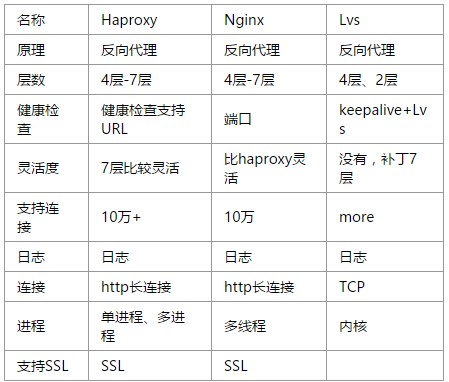
二、haproxy配置
1、global
globallog 127.0.0.1 local2 #打印日志方式chroot /var/lib/haproxypidfile /var/run/haproxy.pid #定义Haproxy的IPmaxconn 4000 #每个进程的最大连接数user haproxy #用户group haproxy #组daemon #以守护进程的方式nbproc 16 # 启动的进程数,默认是1# turn on stats unix socketstats socket /var/lib/haproxy/stats- 1
- 2
- 3
- 4
- 5
- 6
- 7
- 8
- 9
- 10
- 11
2、defaults
defaultsmode http #设置 mode的语法(http|tcp|health),http是七层模式,tcp是四层模式,health是健康检查,返回oklog global #采取全军global的日志option httplog # 启用日志记录http请求,默认haproxy不记录http的请求option dontlognulloption http-server-closeoption redispatch #当serverId对应的服务器挂掉后,强制定向到其他健康的服务器option abortonclose #当服务器负载很高的时候,自动结束掉当前队列处理比较久的链接option forwardfor except 127.0.0.0/8option redispatchretries 3 #重试次数timeout http-request 10s # http请求超时时间timeout queue 1m # 队列超时时间timeout connect 10s # 连接超时timeout client 1m #客户端超时时间timeout server 1m #服务器超时时间timeout http-keep-alive 10s # 心跳超时时间timeout check 10s maxconn 3000 #默认最大连接数- 1
- 2
- 3
- 4
- 5
- 6
- 7
- 8
- 9
- 10
- 11
- 12
- 13
- 14
- 15
- 16
- 17
- 18
- 19
3、frontend
frontend test.com #定义前端服务器(haproxy) bind *:80 #监听地址 acl web-client path_beg -i /vsphere-client acl bbs hdr_reg(host) -i ^(bbs.test.com|shequ.test.com|forum) acl monitor hdr_beg(host) -i monitor.test.com #定义ACL名称,对应的请求的主机头是monitor.test.com acl www hdr_beg(host) -i www.test.com use_backend cache.test.com if static use_backend monitor.test.com if bbs or monitor use_backend www.test.com if www use_backend vsphere-client if web-client default_backend www.test.com #指定默认的后端服务器 - 1
- 2
- 3
- 4
- 5
- 6
- 7
- 8
- 9
- 10
- 11
4、backend
backend monitor.test.com #定义后端服务器群(web server/apache/nginx/iis..) mode http option forwardfor #后端服务器(apache/nginx/iis/*),从Http Header中获得客户端IP balance leastconn #参见 balance 算法:cookie SERVERID #插入serverid到cookie中,serverid后面可以定义 option httpchk HEAD /check.html #用来做健康检查html文档 基于七层的健康检查,默认为4层#option httpchk HEAD /index.php HTTP/1.1\r\nHost:monitor.test.com #HTTP && Host server server1 10.0.100.70:80 cookie server1 check inter 2000 rise 3 fall 3 weight 3 #服务器定义: #cookie server1表示serverid为server1; #check inter 2000 是检测心跳频率(check 默认 ); #rise 3 表示 3次正确认为服务器可用; #fall 3 表示 3次失败认为服务器不可用; #weight 表示权重。Name server 列表- 1
- 2
- 3
- 4
- 5
- 6
- 7
- 8
- 9
- 10
- 11
- 12
- 13
- 14
5、listen
listen admin_stat #status bind 0.0.0.0:8080 #监听端口 mode http #http的7层模式 stats refresh 30s #统计页面自动刷新时间 stats uri /haproxy_stats_url #统计页面URL stats realm Haproxy\ Statistics #统计页面密码框上提示文本 stats auth admin:admin #统计页面用户名和密码设置 stats hide-version #隐藏统计页面上HAProxy的版本信息 stats admin if TRUE #手工启用/禁用,后端服务器 - 1
- 2
- 3
- 4
- 5
- 6
- 7
- 8
- 9
balance 算法:
1. roundrobin,表示简单的轮询
2. static-rr,表示根据权重,
3. leastconn,表示最少连接者先处理,
4. source,表示根据请求源IP,
5. uri,表示根据请求的URI;
6. url_param,表示根据请求的URl参数'balance url_param' requires an URL parameter name
7. hdr(name),表示根据HTTP请求头来锁定每一次HTTP请求;
8. rdp-cookie(name),表示根据据cookie(name)来锁定并哈希每一次TCP请求。- 1
- 2
- 3
- 4
- 5
- 6
- 7
- 8
6、acl 规则
acl bbs       hdr_reg(host) -i ^(bbs.test.com|forum.test.com)  #使用正则匹配
acl bbs_path  path_beg -i /bbs                #url 目录
acl youxi     path_beg -i /youxi
acl static    path_end -i .html .css .js      #url 结尾文件
acl php       path_end -i .php
acl jsp       path_end -i .jsp .do  use_backend bbs_pool if bbs or bbs_path       #注意 "or"
use_backend youxi_pool if youxi
use_backend static_pool if static
use_backend php_pool if php
use_backend jsp_pool if jsp
default_backend www.test.com - 1
- 2
- 3
- 4
- 5
- 6
- 7
- 8
- 9
- 10
- 11
- 12
- 13
举例:
openstack官方负载均衡样例
globalchroot /var/lib/haproxydaemongroup haproxymaxconn 4000pidfile /var/run/haproxy.piduser haproxydefaultslog globalmaxconn 4000option redispatchretries 3timeout http-request 10stimeout queue 1mtimeout connect 10stimeout client 1mtimeout server 1mtimeout check 10slisten dashboard_clusterbind <Virtual IP>:443balance sourceoption tcpkaoption httpchkoption tcplogserver controller1 10.0.0.12:443 check inter 2000 rise 2 fall 5server controller2 10.0.0.13:443 check inter 2000 rise 2 fall 5server controller3 10.0.0.14:443 check inter 2000 rise 2 fall 5listen galera_clusterbind <Virtual IP>:3306balance sourceoption mysql-checkserver controller1 10.0.0.12:3306 check port 9200 inter 2000 rise 2 fall 5server controller2 10.0.0.13:3306 backup check port 9200 inter 2000 rise 2 fall 5server controller3 10.0.0.14:3306 backup check port 9200 inter 2000 rise 2 fall 5listen glance_api_clusterbind <Virtual IP>:9292balance sourceoption tcpkaoption httpchkoption tcplogserver controller1 10.0.0.12:9292 check inter 2000 rise 2 fall 5server controller2 10.0.0.13:9292 check inter 2000 rise 2 fall 5server controller3 10.0.0.14:9292 check inter 2000 rise 2 fall 5listen glance_registry_clusterbind <Virtual IP>:9191balance sourceoption tcpkaoption tcplogserver controller1 10.0.0.12:9191 check inter 2000 rise 2 fall 5server controller2 10.0.0.13:9191 check inter 2000 rise 2 fall 5server controller3 10.0.0.14:9191 check inter 2000 rise 2 fall 5listen keystone_admin_clusterbind <Virtual IP>:35357balance sourceoption tcpkaoption httpchkoption tcplogserver controller1 10.0.0.12:35357 check inter 2000 rise 2 fall 5server controller2 10.0.0.13:35357 check inter 2000 rise 2 fall 5server controller3 10.0.0.14:35357 check inter 2000 rise 2 fall 5listen keystone_public_internal_clusterbind <Virtual IP>:5000balance sourceoption tcpkaoption httpchkoption tcplogserver controller1 10.0.0.12:5000 check inter 2000 rise 2 fall 5server controller2 10.0.0.13:5000 check inter 2000 rise 2 fall 5server controller3 10.0.0.14:5000 check inter 2000 rise 2 fall 5listen nova_ec2_api_clusterbind <Virtual IP>:8773balance sourceoption tcpkaoption tcplogserver controller1 10.0.0.12:8773 check inter 2000 rise 2 fall 5server controller2 10.0.0.13:8773 check inter 2000 rise 2 fall 5server controller3 10.0.0.14:8773 check inter 2000 rise 2 fall 5listen nova_compute_api_clusterbind <Virtual IP>:8774balance sourceoption tcpkaoption httpchkoption tcplogserver controller1 10.0.0.12:8774 check inter 2000 rise 2 fall 5server controller2 10.0.0.13:8774 check inter 2000 rise 2 fall 5server controller3 10.0.0.14:8774 check inter 2000 rise 2 fall 5listen nova_metadata_api_clusterbind <Virtual IP>:8775balance sourceoption tcpkaoption tcplogserver controller1 10.0.0.12:8775 check inter 2000 rise 2 fall 5server controller2 10.0.0.13:8775 check inter 2000 rise 2 fall 5server controller3 10.0.0.14:8775 check inter 2000 rise 2 fall 5listen cinder_api_clusterbind <Virtual IP>:8776balance sourceoption tcpkaoption httpchkoption tcplogserver controller1 10.0.0.12:8776 check inter 2000 rise 2 fall 5server controller2 10.0.0.13:8776 check inter 2000 rise 2 fall 5server controller3 10.0.0.14:8776 check inter 2000 rise 2 fall 5listen ceilometer_api_clusterbind <Virtual IP>:8777balance sourceoption tcpkaoption tcplogserver controller1 10.0.0.12:8777 check inter 2000 rise 2 fall 5server controller2 10.0.0.13:8777 check inter 2000 rise 2 fall 5server controller3 10.0.0.14:8777 check inter 2000 rise 2 fall 5listen nova_vncproxy_clusterbind <Virtual IP>:6080balance sourceoption tcpkaoption tcplogserver controller1 10.0.0.12:6080 check inter 2000 rise 2 fall 5server controller2 10.0.0.13:6080 check inter 2000 rise 2 fall 5server controller3 10.0.0.14:6080 check inter 2000 rise 2 fall 5listen neutron_api_clusterbind <Virtual IP>:9696balance sourceoption tcpkaoption httpchkoption tcplogserver controller1 10.0.0.12:9696 check inter 2000 rise 2 fall 5server controller2 10.0.0.13:9696 check inter 2000 rise 2 fall 5server controller3 10.0.0.14:9696 check inter 2000 rise 2 fall 5listen swift_proxy_clusterbind <Virtual IP>:8080balance sourceoption tcplogoption tcpkaserver controller1 10.0.0.12:8080 check inter 2000 rise 2 fall 5server controller2 10.0.0.13:8080 check inter 2000 rise 2 fall 5server controller3 10.0.0.14:8080 check inter 2000 rise 2 fall 5- 1
- 2
- 3
- 4
- 5
- 6
- 7
- 8
- 9
- 10
- 11
- 12
- 13
- 14
- 15
- 16
- 17
- 18
- 19
- 20
- 21
- 22
- 23
- 24
- 25
- 26
- 27
- 28
- 29
- 30
- 31
- 32
- 33
- 34
- 35
- 36
- 37
- 38
- 39
- 40
- 41
- 42
- 43
- 44
- 45
- 46
- 47
- 48
- 49
- 50
- 51
- 52
- 53
- 54
- 55
- 56
- 57
- 58
- 59
- 60
- 61
- 62
- 63
- 64
- 65
- 66
- 67
- 68
- 69
- 70
- 71
- 72
- 73
- 74
- 75
- 76
- 77
- 78
- 79
- 80
- 81
- 82
- 83
- 84
- 85
- 86
- 87
- 88
- 89
- 90
- 91
- 92
- 93
- 94
- 95
- 96
- 97
- 98
- 99
- 100
- 101
- 102
- 103
- 104
- 105
- 106
- 107
- 108
- 109
- 110
- 111
- 112
- 113
- 114
- 115
- 116
- 117
- 118
- 119
- 120
- 121
- 122
- 123
- 124
- 125
- 126
- 127
- 128
- 129
- 130
- 131
- 132
- 133
- 134
- 135
- 136
- 137
- 138
- 139
- 140
- 141
- 142
- 143
- 144
- 145
- 146
- 147
- 148
- 149
- 150
- 151
参考:
http://www.haproxy.com/