
一、概述
官方文档:https://vuex.vuejs.org/zh/installation.html
1.1vuex有什么用
Vuex:实现data(){}内数据多个组件间共享一种解决方案(类似react的redux)
1.2什么情况下使用vuex
虽然 Vuex 可以帮助我们管理共享状态,但也附带了更多的概念和框架。这需要对短期和长期效益进行权衡。
如果您不打算开发大型单页应用,使用 Vuex 可能是繁琐冗余的。
确实是如此——如果您的应用够简单,您最好不要使用 Vuex。
一个简单的 global event bus 就足够您所需了。
但是,如果您需要构建是一个中大型单页应用,您很可能会考虑如何更好地在组件外部管理状态,Vuex 将会成为自然而然的选择。
1.3Vuex状态管理
view ->(dispatch) Action ->(Commit) Mutations ->(Mutate) State -> View
注意:Action不是必需品,如果有异步操作才可能用到Action,否则可以不使用
1.4Actions:
Action 提交的是 mutation,而不是直接变更状态。
Action 可以包含任意异步操作。
二、安装及使用
官方文档:https://vuex.vuejs.org/zh/installation.html
安装方法1,npm
cnpm install vuex --save
或
npm install vuex --save
安装方法2,cdn
<script src="/path/to/vue.js"></script>
<script src="/path/to/vuex.js"></script>
其它略过,见文档。
【使用】
在一个模块化的打包系统中,您必须显式地通过 Vue.use() 来安装 Vuex:
import Vue from 'vue'
import Vuex from 'vuex'
Vue.use(Vuex)
当使用全局 script 标签引用 Vuex 时,不需要以上安装过程。
2.1 vuex定义共享数据和引用 state:{}
应用场景: 例如在购物车中,你在商品详情页进行加减库存操作,而到购物车详情中时,用之前学得的data(){}内数据用法,你是得不到商品详情里的商品数量这个数据的,此时就引入了state:{}做为所有页面的共享数据,加减商品都可使用此处的数据,从而实现数据的共享。
代码实例
(多余代码为父子组件互传值复习)
第1步,引入vuex并创建store实例 src/main.js
[1]引入vuex
[2]使用vuex
[3]创建一个store实例(主要)
[4]所有组件共用数据存放处
[5]注入store(重要)
import Vue from 'vue'
import App from './App.vue'
import Vuex from 'vuex' //[1]引入vuexVue.use(Vuex)//[2]使用vuex//[3]创建一个store实例
const store=new Vuex.Store({state:{//[4]所有组件共用数据存放处count:10}
})new Vue({el: '#app',store,//[5]注入storerender: h => h(App)
})
第2步,引用1步所创建的共享数据count(src/components/home.vue)
【1】获取store里的共享数据方法1直接调用(this.$store.state.count)
<template><div><Hello :title='msg' @msg='getmsg'/><br/>{{msg2}}<br/><!-- 【1】获取store里的共享数据方法1 -->home:获取vuex的store共用数据:{{this.$store.state.count}}</div>
</template><script>
import Hello from './hello.vue';export default{name:'home',data(){return{msg:'Home向Hello传的消息',msg2:''}},components:{Hello},methods:{getmsg(data){this.msg2=data;}}}
</script><style>
</style>
第2.2步,其它组件都可以引用共享数据
src/components/hello.vue
【1】写一个函数获取vuex并返回store共享数据
【2】获取vuex的store共享数据方法2(在computed内写一个获取函数,再调用)
<template><div><!--【2】获取vuex的store共享数据方法2 -->hello子组件:{{getCount}}----{{title}}<br/><button @click="sendMsg">给父组件传消息</button></div>
</template><script>
export default{name:'hello',data(){return{msg:'Hello子组件向父组件传数据'}},props:{title:{type:String,default:''}},computed:{//【1】写一个函数获取vuex并返回store共享数据getCount(){return this.$store.state.count}},methods:{sendMsg(){this.$emit('msg',this.msg)}}
}
</script><style>
</style>
效果:成功获取到在mian.js内定义的count数据值
10
2.2 修改共享数据实例 mutaitions:{}
第1步,定义修改共享数据的函数 main.js
[6]更改state里的数据在mutations里写函数操作
[6.1.0]自加函数,用于其它组件操作数据通过 this. s t o r e . c o m m i t ( ′ i n c r e m e n t ′ ) [ 6.1.1 ] 自 减 函 数 , 用 于 其 它 组 件 操 作 数 据 通 过 t h i s . store.commit('increment') [6.1.1]自减函数,用于其它组件操作数据通过 this. store.commit(′increment′)[6.1.1]自减函数,用于其它组件操作数据通过this.store.commit(‘decrement’)
import Vue from 'vue'
import App from './App.vue'
import Vuex from 'vuex' //[1]引入vuexVue.use(Vuex)//[2]使用vuex//[3]创建一个store实例
const store=new Vuex.Store({state:{//[4]所有组件共用数据存放处count:10},//[6]更改state里的数据在mutations里写函数操作mutations: {increment (state) {//[6.1.0]自加函数,用于其它组件操作数据通过 this.$store.commit('increment')state.count++},decrement(state){//[6.1.1]自减函数,用于其它组件操作数据通过 this.$store.commit('decrement')state.count--}}
})new Vue({el: '#app',store,//[5]注入storerender: h => h(App)
})
第2步,在组件中使用1步定义的修改共享数据函数 home.vue
【1】使用mutations里定义好的函数进行共享数据自加操作
【1.1】使用mutations里定义好的函数进行共享数据自减操作
【2】修改共享数据自加
【2.1】修改共享数据自减
<template><div><Hello :title='msg' @msg='getmsg'/><br/>{{msg2}}<br/><!-- 获取store里的共享数据方法1 -->home:获取vuex的store共用数据:{{this.$store.state.count}}<br/><br/><button @click='add'>加store.state里数据</button> <!-- 【2】修改共享数据自加 --><button @click="sub">减</button> <!-- 【2.1】修改共享数据自减 --></div>
</template><script>
import Hello from './hello.vue';export default{name:'home',data(){return{msg:'Home向Hello传的消息',msg2:''}},components:{Hello},methods:{add(){//【1】使用mutations里定义好的函数进行共享数据自加操作this.$store.commit('increment')},sub(){//【1.1】使用mutations里定义好的函数进行共享数据自减操作this.$store.commit('decrement')},getmsg(data){this.msg2=data;}}}
</script><style>
</style>
hello.vue 不重要
<template><div><!--获取vuex的store共享数据方法2 -->hello子组件:{{getCount}}----{{title}}<br/><button @click="sendMsg">给父组件传消息</button></div>
</template><script>
export default{name:'hello',data(){return{msg:'Hello子组件向父组件传数据'}},props:{title:{type:String,default:''}},computed:{//写一个函数获取vuex并返回store共享数据getCount(){return this.$store.state.count}},methods:{sendMsg(){this.$emit('msg',this.msg)}}
}
</script><style>
</style>
效果:点加按钮会进行共享数据自加操作,减则自减
注意:数据变更后,所有地方数据都会自动进行变更

2.3 actions的使用
Actions:
Action 提交的是 mutation,而不是直接变更状态。
Action 可以包含任意异步操作。
mutaitions内只能执行同步操作。
src/main.js 定义actions:{}内函数
【1】用动作操作mutations里函数
import Vue from 'vue'
import App from './App.vue'
import Vuex from 'vuex' //[1]引入vuexVue.use(Vuex)//[2]使用vuex//[3]创建一个store实例
const store=new Vuex.Store({state:{//[4]所有组件共用数据存放处count:10},//[6]更改state里的数据在mutations里写函数操作mutations: {increment (state) {//[6.1.0]自加函数,用于其它组件操作数据通过 this.$store.commit('increment')state.count++},decrement(state){//[6.1.1]自减函数,用于其它组件操作数据通过 this.$store.commit('decrement')state.count--}},actions:{//【1】用动作操作mutations里函数increment(context){//context承上启下context.commit('increment');},decrement(context){context.commit('decrement');}}
})new Vue({el: '#app',store,//[5]注入storerender: h => h(App)
})
src/components/home.vue 调用actions内的函数
【1】使用main.js里actions里定义好的函数进行共享数据自加操作
【1.1】使用main.js里action里定义好的函数进行共享数据自减操作
this.$store.dispatch(‘decrement’)
<template><div><Hello :title='msg' @msg='getmsg'/><br/>{{msg2}}<br/><!-- 获取store里的共享数据方法1 -->home:获取vuex的store共用数据:{{this.$store.state.count}}<br/><br/><button @click='add'>加store.state里数据</button> <!-- 【2】修改共享数据自加 --><button @click="sub">减</button> <!-- 【2.1】修改共享数据自减 --></div>
</template><script>
import Hello from './hello.vue';export default{name:'home',data(){return{msg:'Home向Hello传的消息',msg2:''}},components:{Hello},methods:{add(){//【1】使用main.js里actions里定义好的函数进行共享数据自加操作// this.$store.commit('increment')this.$store.dispatch('increment')},sub(){//【1.1】使用main.js里action里定义好的函数进行共享数据自减操作// this.$store.commit('decrement')this.$store.dispatch('decrement')},getmsg(data){this.msg2=data;}}}
</script><style>
</style>
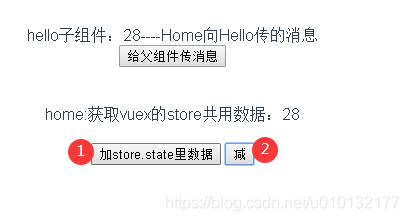
效果:同上,操作共享数据,1加,2减
2.3.1 actions内执行异步操作
src/main.js actions:{}内进行异步模拟
【异步】异步操作模拟,利用setTimeout函数延迟1秒执行自加操作
import Vue from 'vue'
import App from './App.vue'
import Vuex from 'vuex' //[1]引入vuexVue.use(Vuex)//[2]使用vuex//[3]创建一个store实例
const store=new Vuex.Store({state:{//[4]所有组件共用数据存放处count:10},//[6]更改state里的数据在mutations里写函数操作mutations: {increment (state) {//[6.1.0]自加函数,用于其它组件操作数据通过 this.$store.commit('increment')state.count++},decrement(state){//[6.1.1]自减函数,用于其它组件操作数据通过 this.$store.commit('decrement')state.count--}},actions:{increment(context){// context.commit('increment');setTimeout(function(){ //【异步】异步操作模拟,利用setTimeout函数延迟1秒执行自加操作context.commit('increment');},1000)},decrement(context){context.commit('decrement');}}
})new Vue({el: '#app',store,//[5]注入storerender: h => h(App)
})
src/components/home.vue
代码同上例,略过
效果同上例略过
2.4 getter:{}的使用
**应用场景:**例如在购物车中,利用2.3例的自减减少库存,当减少到0时还可以继续减为负数,此时商家将要向用户倒找钱,这样显然不合理。因此引入getter函数;
src/main.js 写 getters用于控制共享数据
【getter】用于控制共享数据的使用
如果count数据大于0则返回count,否则只返回0(小于0时只返回0)
import Vue from 'vue'
import App from './App.vue'
import Vuex from 'vuex' //[1]引入vuexVue.use(Vuex)//[2]使用vuex//[3]创建一个store实例
const store=new Vuex.Store({state:{//[4]所有组件共用数据存放处count:10},getters:{//【getter】用于控制共享数据的使用controlState(state){ //如果count数据大于0则返回count,否则只返回0(小于0时只返回0)return state.count > 0 ? state.count : 0}},//[6]更改state里的数据在mutations里写函数操作mutations: {increment (state) {//[6.1.0]自加函数,用于其它组件操作数据通过 this.$store.commit('increment')state.count++},decrement(state){//[6.1.1]自减函数,用于其它组件操作数据通过 this.$store.commit('decrement')state.count--}},actions:{increment(context){// context.commit('increment');setTimeout(function(){ //异步操作模拟,利用setTimeout函数延迟1秒执行自加操作context.commit('increment');},1000)},decrement(context){context.commit('decrement');}}
})new Vue({el: '#app',store,//[5]注入storerender: h => h(App)
})
src/components/home.vue
【getters-1】通过computed写函数来获取store里的共享数据方法
【getters-2】通过computed写函数来显示store里的共享数据
<template><div><Hello :title='msg' @msg='getmsg'/><br/>{{msg2}}<br/><!-- 【getters-2】通过computed写函数来显示store里的共享数据 -->home:获取vuex的store共用数据:{{getState}}<br/><br/><button @click='add'>加store.state里数据</button> <!--修改共享数据自加 --><button @click="sub">减</button> <!--修改共享数据自减 --></div>
</template><script>
import Hello from './hello.vue';export default{name:'home',data(){return{msg:'Home向Hello传的消息',msg2:''}},components:{Hello},computed:{//【getters-1】通过computed写函数来获取store里的共享数据方法getState(){return this.$store.getters.controlState;}},methods:{add(){//使用mutations里定义好的函数进行共享数据自加操作// this.$store.commit('increment')this.$store.dispatch('increment')},sub(){//使用mutations里定义好的函数进行共享数据自减操作// this.$store.commit('decrement')this.$store.dispatch('decrement')},getmsg(data){this.msg2=data;}}}
</script><style>
</style>
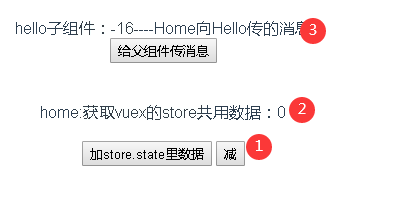
效果:加了用getter获取数据2处最多只能减到0,没加的,3还是会返回负数
2.5 moudel模块操作
官方文档:https://vuex.vuejs.org/zh/guide/modules.html
由于使用单一状态树,应用的所有状态会集中到一个比较大的对象。当应用变得非常复杂时,store 对象就有可能变得相当臃肿。
为了解决以上问题,Vuex 允许我们将 store 分割成模块(module)。每个模块拥有自己的 state、mutation、action、getter、甚至是嵌套子模块——从上至下进行同样方式的分割:
const moduleA = {state: { ... },mutations: { ... },actions: { ... },getters: { ... }
}const moduleB = {state: { ... },mutations: { ... },actions: { ... }
}const store = new Vuex.Store({modules: {a: moduleA,b: moduleB}
})store.state.a // -> moduleA 的状态
store.state.b // -> moduleB 的状态
2.6 store提取为单独文件
也可参考 router
具体步骤:
- 新建一个src/store文件夹
- 在建立一个文件/src/store/index.js
- 把store提取到2步建好的文件
- 在main.js里引入store文件
/src/store/index.js
【1】注意导出:创建一个store仓库
import Vue from "vue"
import Vuex from 'vuex'Vue.use(Vuex)// 【1】注意导出:创建一个store仓库
export default new Vuex.Store({state: {count: 10},mutations: {increment(state) {state.count++;},decrement(state) {state.count--;}},actions: {// context:承上启下increment(context) {setTimeout(function() {context.commit("increment");})},decrement(context) {setTimeout(function() {context.commit("decrement");})}},getters: {controlState(state) {return state.count > 0 ? state.count : 0}}
});
main.js
【1】全局引入store文件
import Vue from 'vue'
import App from './App.vue'
import store from './store/index.js' //【1】全局引入store文件new Vue({el: '#app',store,//[5]注入storerender: h => h(App)
})