
shiro是一个权限管理框架,将安全认证相关的功能抽取出来组成,使用shiro就可以非常快速的完成认证、授权等功能的开发,降低系统成本。为了能够为多个系统提供统一认证入口,又使用了cas,而且二者都涉及到对session管理,所以需要集成。
cas基本协议过程:
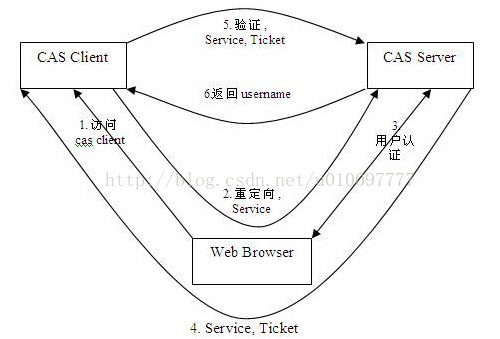
基础模式的SSO访问流程步骤:
- 访问服务:客户端发送请求访问应用系统提供的服务资源。
- 定向认证:客户端重定向用户请求到中心认证服务器。
- 用户认证:用户进行身份认证
- 发放票据:服务器会产生一个随机的 Service Ticket 。
- 验证票据: SSO 服务器验证票据 Service Ticket 的合法性,验证通过后,允许客户端访问服务。
- 传输用户信息: SSO 服务器验证票据通过后,传输用户认证结果信息给客户端。
cas认证时序图
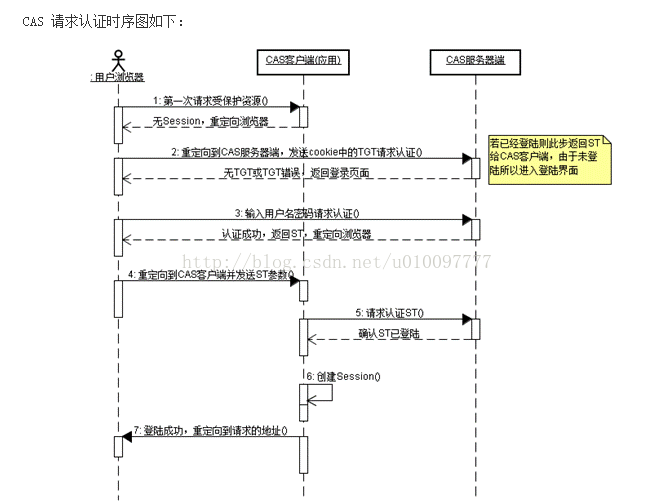
对于访问受保护资源的每个 Web 请求,CAS Client 会分析该请求的 Http 请求中是否包含 Service Ticket,如果没有,则说明当前用户尚未登录,于是将请求重定向到指定好的 CAS Server 登录地址,并传递 Service (也就是要访问的目的资源地址),以便登录成功过后转回该地址。用户在第 3 步中输入认证信息,如果登录成功,CAS Server 随机产生一个相当长度、唯一、不可伪造的 Service Ticket,并缓存以待将来验证,之后系统自动重定向到 Service所在地址,并为客户端浏览器设置一个 Ticket Granted Cookie(TGC),CAS Client 在拿到Service 和新产生的 Ticket 过后,在第 5,6 步中与 CAS Server 进行身份合适,以确保 Service Ticket 的合法性。
在该协议中,所有与 CAS 的交互均采用 SSL 协议,确保,ST 和 TGC 的安全性。协议工作过程中会有 2 次重定向的过程,但是 CAS Client 与 CAS Server 之间进行 Ticket 验证的过程对于用户是透明的。
Shiro CAS 认证流程
· 1 用户首次访问受保护 的资源;例如 http://casclient/security/view.do
· 2 由于未通过认证,Shiro首先把请求地址(http://casclient/security/view.do)缓存起来。
· 3然后跳转到 CAS服务器进行登录认证,在 CAS 服务端认证完成后需要返回到请求的 CAS 客户端,因此在请求时,必须在参数中添加返回地址 ( 在 Shiro 中名为 CAS Service)。 例如 http://casserver/login?service=http://casclient/shiro-cas
· 4由CAS服务器认证通过后,CAS 服务器为返回地址添加ticket。例如http://casclient/shiro-cas?ticket=ST-4-BWMEnXfpxfVD2jrkVaLl-cas
· 5接下来,Shiro会校验 ticket 是否有效。由于 CAS 客户端不提供直接认证,所以 Shiro 会向 CAS 服务端发起 ticket 校验检查,只有服务端返回成功时,Shiro 才认为认证通过。
· 6认证通过,进入授权检查。Shiro授权检查与前面提到的相同。
· 7 最后授权检查通过,用户正常访问到 http://casclient/security/view.do。
项目中配置:
Shiro在1.2.0的时候提供了对cas的集成。因此在项目中添加shiro-cas的依赖<dependency><groupId>org.apache.shiro</groupId><artifactId>shiro-cas</artifactId><version>${shiro.version}</version></dependency>Shiro对cas集成后,cas client的配置更加简单了。原理就是将casFilter添加到到shiroFilter的filterChain中。 shiroFilter是在web.xml中定义的
<?xml version="1.0" encoding="UTF-8"?>
<beans xmlns="http://www.springframework.org/schema/beans"xmlns:aop="http://www.springframework.org/schema/aop" xmlns:tx="http://www.springframework.org/schema/tx"xmlns:xsi="http://www.w3.org/2001/XMLSchema-instance" xmlns:jee="http://www.springframework.org/schema/jee"xmlns:context="http://www.springframework.org/schema/context"xsi:schemaLocation="http://www.springframework.org/schema/beans http://www.springframework.org/schema/beans/spring-beans-3.0.xsd http://www.springframework.org/schema/aop http://www.springframework.org/schema/aop/spring-aop-3.0.xsd http://www.springframework.org/schema/tx  http://www.springframework.org/schema/tx/spring-tx-3.0.xsd http://www.springframework.org/schema/jee http://www.springframework.org/schema/jee/spring-jee-2.5.xsdhttp://www.springframework.org/schema/contexthttp://www.springframework.org/schema/context/spring-context-3.0.xsd"default-lazy-init="true"><!-- spring 可支持注解 --><context:annotation-config /> <!-- 用于扫描其他的.properties配置文件 --><bean id="propertyConfigurer"class="org.springframework.beans.factory.config.PropertyPlaceholderConfigurer"><property name="locations"><list><value>classpath:config/shiro-cas.properties</value></list></property></bean><!-- ~~~~~~~~~~~~~~~~~~~~~~~~~~~配置sessionManager start~~~~~~~~~~~~~~~~~~~~~ --><!-- 缓存管理器redis-start --><!-- 自定义cacheManager --><bean id="redisManager" class="com.tgb.itoo.authority.cache.RedisManager"></bean><bean id="redisCache" class="com.tgb.itoo.authority.cache.RedisCache"><constructor-arg ref="redisManager"></constructor-arg></bean><!-- 自定义redisManager-redis --><bean id="redisCacheManager" class="com.tgb.itoo.authority.cache.RedisCacheManager"><property name="redisManager" ref="redisManager" /></bean><!-- 缓存管理器redis-end-李社河-2015年4月14日 --><!-- session会话存储的实现类 --><bean id="redisShiroSessionDAO" class="com.tgb.itoo.authority.cache.RedisSessionDAO"><property name="redisManager" ref="redisManager" /></bean><!-- sessionIdCookie的实现,用于重写覆盖容器默认的JSESSIONID --><bean id="sharesession" class="org.apache.shiro.web.servlet.SimpleCookie"><!-- cookie的name,对应的默认是 JSESSIONID --><constructor-arg name="name" value="SHAREJSESSIONID" /><!-- jsessionId的path为 / 用于多个系统共享jsessionId --><property name="path" value="/" /></bean><!-- session管理器 --><bean id="sessionManager"class="org.apache.shiro.web.session.mgt.DefaultWebSessionManager"><!-- 设置全局会话超时时间,默认30分钟(1800000) --><property name="globalSessionTimeout" value="1800000" /><!-- 是否在会话过期后会调用SessionDAO的delete方法删除会话 默认true --><property name="deleteInvalidSessions" value="true" /><!-- 会话验证器调度时间 --><property name="sessionValidationInterval" value="1800000" /><!-- session存储的实现 --><property name="sessionDAO" ref="redisShiroSessionDAO" /><!-- sessionIdCookie的实现,用于重写覆盖容器默认的JSESSIONID --><property name="sessionIdCookie" ref="sharesession" /><!-- 定时检查失效的session --><property name="sessionValidationSchedulerEnabled" value="true" /></bean><!-- ~~~~~~~~~~~~~~~~~~~~~~~~~~~配置sessionManager end~~~~~~~~~~~~~~~~~~~~~~~~ --><!-- ~~~~~~~~~~~~~~~~~~~~~~~~~~配置securityManager start~~~~~~~~~~~~~~~~~~~ --><!-- 取得用户的权限信息集合 --><!-- shiro于数据交互的类 ,自己写的类的实现-ShiroRealmBean自己重写的类的实现 --><bean id="shiroRealm" class="com.tgb.itoo.authority.service.ShiroRealmBean"><property name="defaultRoles" value="user"></property><!-- 注入自己实现的类,授权的过程-PermissionManager是云平台重写的授权的过程,用户Id->角色->资源 --><property name="casServerUrlPrefix" value="${casServerUrlPrefix}"></property><property name="casService" value="${casService}"></property></bean><!-- 如果要实现cas的remember me的功能,需要用到下面这个bean,并设置到securityManager的subjectFactory中 --><bean id="casSubjectFactory" class="org.apache.shiro.cas.CasSubjectFactory" /><!-- shiro管理核心类 --><bean id="securityManager" class="org.apache.shiro.web.mgt.DefaultWebSecurityManager"><property name="realm" ref="shiroRealm"></property><property name="sessionMode" value="http"></property><property name="subjectFactory" ref="casSubjectFactory"></property><property name="cacheManager" ref="redisCacheManager" /><property name="sessionManager" ref="sessionManager"></property></bean><!-- 保证实现shiro内部的生命周期函数bean的执行 --><bean id="lifecycleBeanPostProcessor" class="org.apache.shiro.spring.LifecycleBeanPostProcessor" /><!-- 开启shiro的注解,需借助SpringAOP扫描使用Shiro注解的类,并在必要时进行安全逻辑验证 --><beanclass="org.springframework.aop.framework.autoproxy.DefaultAdvisorAutoProxyCreator"depends-on="lifecycleBeanPostProcessor"></bean><beanclass="org.apache.shiro.spring.security.interceptor.AuthorizationAttributeSourceAdvisor"><property name="securityManager" ref="securityManager" /></bean><!-- ~~~~~~~~~~~~~~~~~~~~~~~~~~~~~~~~~~~~~~配置securityManager end~~~~~~~~~~ --><!-- ~~~~~~~~~~~~~~~~~~~~~~~~~~~~~~~~~~ 配置shiroSecurityFilter start~~~~~~~~~~ --><!-- shiro过滤器 start --><bean id="shiroSecurityFilter" class="org.apache.shiro.spring.web.ShiroFilterFactoryBean"><property name="securityManager" ref="securityManager"></property><property name="loginUrl" value="${loginUrl}"></property><property name="filters"><map>
<!--添加casFilter到shiroFilter --> <entry key="casFilter"><bean class="org.apache.shiro.cas.CasFilter"><!--配置验证错误时的失败页面 /main 为系统登录页面 --><property name="failureUrl" value="/message.jsp" /><property name="successUrl" value="getSystemindex" /></bean></entry> </map></property><!-- 过滤器链,请求url对应的过滤器 --><property name="filterChainDefinitions"><value>/mobile_**/**=anon/message.jsp=anon/shiro-cas=casFilter<!-- /shirologout=logoutFilter -->/logout=logout/**=user</value></property></bean><!-- shiro过滤器 end --><!-- ~~~~~~~~~~~~~~~~~~~~~~~~~~~~~~~~~~~~~~~配置shiroSecurityFilter end~~ --></beans>shiroRealmBean:负责授权
package com.tgb.itoo.authority.service;import java.util.Iterator;
import java.util.List;
import org.apache.shiro.authz.AuthorizationInfo;
import org.apache.shiro.authz.SimpleAuthorizationInfo;
import org.apache.shiro.cas.CasRealm;
import org.apache.shiro.subject.PrincipalCollection;/*** * @author hanyi**/
public class ShiroRealmBean extends CasRealm {private ShiroBean permissionMgr;/*** 负责授权*/@Overrideprotected AuthorizationInfo doGetAuthorizationInfo(PrincipalCollection principals) {String permissionName;try {//得到userCodeSimpleAuthorizationInfo author = new SimpleAuthorizationInfo();String userCode = (String) principals.getPrimaryPrincipal();//通过自己写的实现来得到用户权限集合List<String> lstPermission = permissionMgr.queryUserPermission(userCode);Iterator<String> it = lstPermission.iterator();//遍历权限集合添加到授权信息对象while (it.hasNext()) {permissionName = it.next().toString();author.addStringPermission(permissionName);}return author;} catch (Exception e) {e.printStackTrace();return null;}}public ShiroBean getPermissionMgr() {return permissionMgr;}public void setPermissionMgr(ShiroBean permissionMgr) {this.permissionMgr = permissionMgr;}}说明:shiroRealmBean继承了CasRealm,CasRealm又继承了AuthorizingRealm。所以,
shiroRealmBean中具体写了授权实现逻辑,而认证则调用了CasRealm中的方法
shiro-cas.properties文件
loginUrl=http://192.168.22.246:8888/cas/login?service=http://localhost:8091/itoo-exam-template-web/shiro-cas
successUrl=http://localhost:8091/itoo-exam-template-web/addTemplet
casServerUrlPrefix=http://192.168.22.246:8888/cas
casService=http://localhost:8091/itoo-exam-template-web/shiro-cas
说明:
loginUrl:cas登录页面(带有请求的受保护资源,用于返回时)
casServerUrlPrefix是CAS服务端地址。
casService是应用服务地址,用来接收CAS服务端票据。
没有单点登录情况下的话,登录认证和授权认证默认在AuthorizingRealm的doGetAuthorizationInfo和doGetAuthenticationInfo中进行,所以我这里是通过shiroDbRealm(继承AuthorizingRealm的自定义类)覆写doGetAuthorizationInfo和doGetAuthenticationInfo,实现自定义登录认证和授权认证。
有单点登录情况下,登录认证是在casserver进行的,那么执行流程是这样的:用户从 cas server登录成功后,跳到cas client的CasRealm执行默认的doGetAuthorizationInfo和doGetAuthenticationInfo,此时doGetAuthenticationInfo做的工作是把登录用户信息传递给shiro,保持默认即可,而对于授权的处理,可以通过MyCasRealm(继承CasRealm的自定义类)覆写doGetAuthorizationInfo进行自定义授权认证。