
绑定默认数据类型
当前端请求的参数比较简单时,可以在后台方法的形参中直接使用SpringMVC提供的默认参数类型进行数据绑定
常用的默认参数类型如下
- HttpServletRequest:通过request对象获取请求信息。
- HttpServletResponse:通过response处理响应信息。
- HttpSession:通过session对象得到session中存储的对象。
- Model/ModelMap:Model是一个接口,ModelMap是一个接口实现,作用时将model数据填充到request域。
- 首先打开eclipse创建一个Web项目,然后将SpringMVC相关JAR包添加到项目的lib目录下,并发布到类路径中。添加JAR包后的lib目录。

- 在web.xml中配置SpringMVC的前端控制器等信息。
- 在src目录下,创建SpringMVC的核心配置文件springmvc-config.xml,在该文件中配置组建扫描器和视图解析器。
<?xml version="1.0" encoding="UTF-8"?> <beans xmlns="http://www.springframework.org/schema/beans"xmlns:mvc="http://www.springframework.org/schema/mvc"xmlns:xsi="http://www.w3.org/2001/XMLSchema-instance"xmlns:context="http://www.springframework.org/schema/context"xsi:schemaLocation="http://www.springframework.org/schema/beanshttp://www.springframework.org/schema/beans/spring-beans-4.3.xsdhttp://www.springframework.org/schema/mvchttp://www.springframework.org/schema/mvc/spring-mvc-4.3.xsdhttp://www.springframework.org/schema/context http://www.springframework.org/schema/context/spring-context-4.3.xsd"><context:component-scan base-package="com.itheima.controller" /><bean id="viewResolver" class="org.springframework.web.servlet.view.InternalResourceViewResolver"><property name="prefix" value="/WEB-INF/jsp/" /><property name="suffix" value=".jsp" /></bean><mvc:annotation-driven conversion-service="conversionService" /><bean id="conversionService" class="org.springframework.context.support.ConversionServiceFactoryBean"><property name="converters"><set><bean class="com.itheima.controller.DateConverter" /></set></property></bean> </beans> - 在src目录下创建一个com.itheima.controller包,在该包下创建一个用于用户操作的控制器类UserController。
package com.itheima.controller; import javax.servlet.http.HttpServletRequest; import org.springframework.stereotype.Controller; import org.springframework.web.bind.annotation.RequestMapping; @Controller public class UserController {@RequestMapping("/selectUser")public String selectUser(HttpServletRequest request) {String id = request.getParameter("id");System.out.println("id="+id);return "success";} } -
在WEB-INF目录下,创建一个名为jsp的文件夹,然后在该文件夹中创建页面文件success.jsp。
<%@ page language="java" contentType="text/html; charset=UTF-8"pageEncoding="UTF-8"%> <!DOCTYPE html> <html> <head> <meta http-equiv="Content-Type" content="text/html; charset=UTF-8"> <title>结束页面</title> </head> <body>OK </body> </html> -
将项目发布到Tomcat服务器并启动,在浏览器中访问地址http://localhost:8080/chapter11/selectUser?id=1。
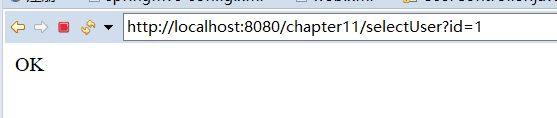
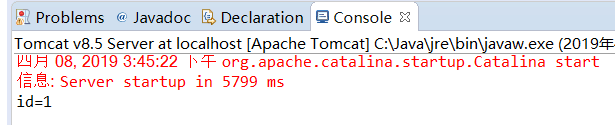
从图中可以看出,后台方法已从请求中正确地获取到了id的参数信息,这说明使用默认的HttpServletRequest参数类型已经完成了数据绑定。