目录
- lxml 的安装
-
- 采用pip 方式安装(亲测成功)
- Beautiful Soup 的安装
-
- 采用pip 方式安装(亲测成功)
- 验证方式
- pyquery 的安装
- tesserocr 的安装
-
- No module named 'PIL' 报错处理
- RuntimeError: Failed to init API, possibly an invalid tessdata path:
- 测试验证
-
- 第1步:新建一个带字符的图片
- 第2步:保存图片到测试文件夹
抓取网页代码之后,下一步就是从网页中提取信息,提取信息的方式有多种多样,可以使用正则来提取。正则方式提取方法可行但比较烦琐,python 提供许多的强大解析库,如 lxml、 Beautiful Soup、 pyquery 等
lxml 的安装
- 官方网站:http://lxml.de
- GitHub:https://github.com/lxml/lxml
- PyPI:https://pypi.python.org/pypi/lxml
采用pip 方式安装(亲测成功)
pip install lxml
Beautiful Soup 的安装
Beautiful Soup 的HTML和XML解析器是依赖于lxml库的,所以在此之前需要确保已经成功安装了lxml库。
- 官方网站:https://www.crummy.com/software/BeautifulSoup/bs4/doc
- 中文文档:https://www.crummy.com/software/BeautifulSoup/bs4/doc.zh
- PyPI:https://pypi.python.org/pypi/beautifulsoup4
采用pip 方式安装(亲测成功)
pip install beautifulsoup4
验证方式
# -*- coding: utf-8 -*-
from bs4 import BeautifulSoup
soup = BeautifulSoup('<p>hello</p>','lxml')
print(soup.p.string)
运行结果如下:
hello
pyquery 的安装
pyquery 同样是一个强大的网页解析工具,它提供了和jQuery类似的语法来解析HTML文档,支持CSS选择器,使用非常方便。
- 相关链接
- GitHub:https://github.com/gawel/pyquery
- PyPI:https://pypi.python.org/pypi/pyquery
- 官方文档:http://pyquery.readthedocs.io
- 采用pip 方式安装(亲测成功)
pip install pyquery
tesserocr 的安装
爬虫过程中遇到各种各样的验证码,而大多数验证码还是图形验证码,这时候我们可以直接用OCR来识别。
- OCR
OCR,即optical character recognition 光学字符识别。对于图形验证码来说,它们都是一些不规则的字符,这些字符确实是由字符加扭曲变换得到的内容。我们通过ocr技术将图形验证码转化为电子文本,然后爬虫将识别结果提交给服务器,便可以达到自动识别验证码的过程。tesserocr是Python的一个OCR识别库,其实是对tesseract做的一个API封装,所以他的核心是tesseract。因此,在安装tesserocr这前要安装tesseract。 - 相关链接
- tesserocr GitHub:https://github.com/sirfz/tesserocr
- tesserocr PyPI:https://pypi.python.org/pypi/tesserocr
- tesseract下载地址:http://digi.bib.uni-mannheim.de/tesseract
- tesseract GitHub:https://github.com/tesseract-ocr/tesseract
- tesseract 语言包:https://github.com/tesseract-ocr/tessdata
- tesseract 文档:https://github.com/tesseract-ocr/tesseract/wiki/Documentation
3.下载并安装tesseract

安装时记得选中Additional language data(download)
- 安装 tesserocr
pip install tesserocr pillow
安装完毕后用如下代码验证。
# -*- coding: utf-8 -*-
import tesserocr
from PIL import Image
image = Image.open('D:/SoftBak/CodeBak/crawl/testchromedriver/Image.png')
print(tesserocr.image_to_text(image))
No module named ‘PIL’ 报错处理
出现如下报错信息:
ImportError: No module named 'PIL'
显然是缺少PIL(Python Imaging Library)库文件,于是通过pip命令行进行安装,输入代码仍然出错。
pip install PIL
安装过程提示报错,如图所示:

后来通过查找资料才知道在高版本中PIL库包含在Pillow库中,再次输入pip install Pillow安装命令时一直处于安装等待状态,最终报错。
没办法,pip命令安装不成功,那只好尝试另一种安装方式easy_install,输入命令行
easy_install Pillow

RuntimeError: Failed to init API, possibly an invalid tessdata path:
上述代码仍然出现报错,主要原因是tesserocr 配置,安装原则应该遵循如下原则。
- 将tesseract(注意不是tesserocr)的安装路径加入环境变量。
- 将tesseract安装目录下的tessdata文件夹复制到你python的安装路径中去。如下图

测试验证
第1步:新建一个带字符的图片

第2步:保存图片到测试文件夹
D:/SoftBak/CodeBak/crawl/testchromedriver/Image.png
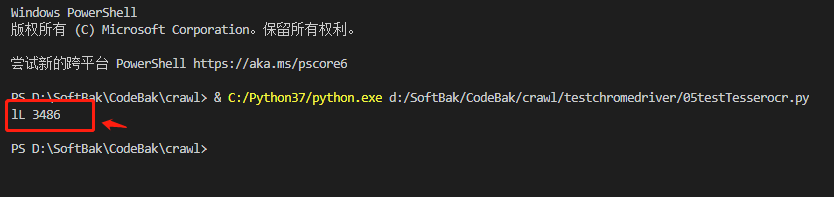
执行如下的python指令
# -*- coding: utf-8 -*-
import tesserocr
from PIL import Image
image = Image.open('D:/SoftBak/CodeBak/crawl/testchromedriver/Image.png')
print(tesserocr.image_to_text(image))
得到如下图所示结果,看了一下模块能够调用成功,但识别效果还是不好。