
前两篇springmvc的文章中都没有和mybatis整合,都是使用静态数据来模拟的,但是springmvc开发不可能不整合mybatis,另外mybatis和spring的整合我之前学习mybatis的时候有写过一篇,但是仅仅是整合mybatis和spring,所以这篇文章我系统的总结一下spring、mybatis和springmvc三个框架的整合(后面学习到maven时,我会再写一篇使用maven整合的文章,这篇没有用到maven)。
1. jar包管理
我之前有写过一篇spring、hibernate和struts2整合的文章,在整合的时候,我个人不喜欢乱,不喜欢啪叽一下将所有jar包往lib中一扔,因为那样没有条理,所以在整合SSM的时候,我还是遵循jar包分类的原则,首先看一下SSM整合都用到了哪些jar包(点我下载): 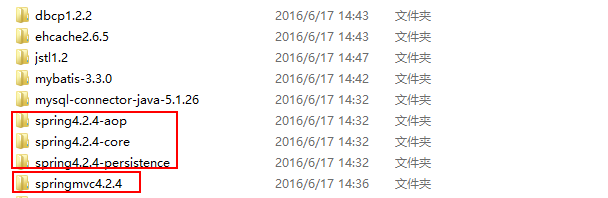
这里我用的是dbcp,当然也可以用c3p0等其他连接池,归归类后jar包就很有条理。
2. 整合思路
关于SSM的架构可以简单看一下下面的草图: 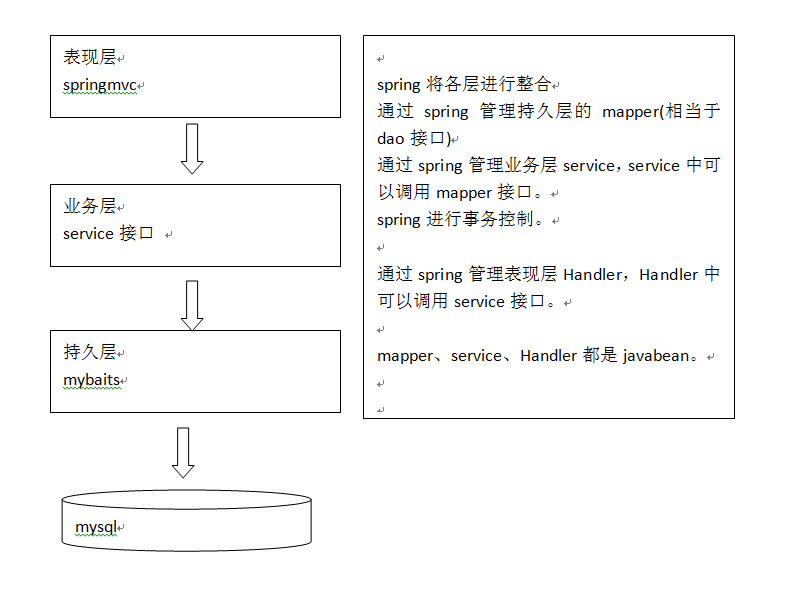
可以看出,spring在进行管理时,是很有条理的,每个层都由spring管理,然后不同的层可以调用其它层,Handler调用service,service调用mapper等。根据这个架构,我们来总结一下整合的思路,根据这个调用关系,我们可以从下往上一步步整合。
- 整合dao层。mybatis和spring整合,通过spring管理mapper接口。
使用mapper的扫描器自动扫描mapper接口在spring中进行注册。- 整合service层。通过spring管理 service接口。
使用配置方式将service接口配置在spring配置文件中。
实现事务控制。- 整合springmvc。由于springmvc是spring的模块,不需要整合。
现在思路清晰了,接下来就开始整合了。在整合前先看一下我整合完的工程结构:
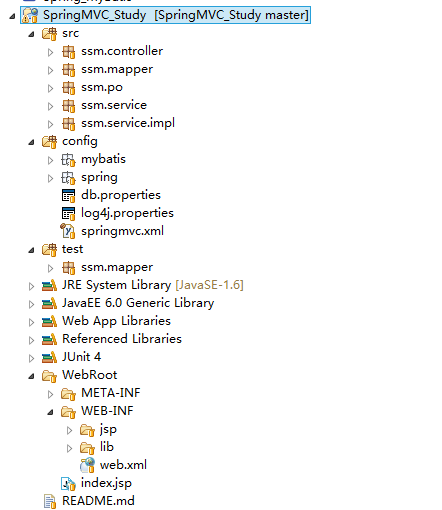
3. 整合dao层
整合dao层也就是整合持久层,那么需要spring的核心包,持久层包,mybatis包,数据库以及连接池的包。所以将spring-persistence/spring-core/mysql-connector/mybatis/dbcp几个文件夹中的jar包拷贝到lib中。
3.1 mybatis全局配置文件
首先得写mybatis的全局配置文件sqlMapConfig.xml,如下:
<?xml version="1.0" encoding="UTF-8" ?>
<!DOCTYPE configuration
PUBLIC "-//mybatis.org//DTD Config 3.0//EN"
"http://mybatis.org/dtd/mybatis-3-config.dtd">
<configuration><!-- setting配置根据需要再添加 --><!-- 配置别名 --><typeAliases><package name="ssm.po"/></typeAliases><!-- mapper这里不需要配置了,因为跟spring整合后,在spring那边会进行mapper的扫描 但必须遵循:mapper.xml和mapper.java必须同名且在一个目录-->
</configuration>- 1
- 2
- 3
- 4
- 5
- 6
- 7
- 8
- 9
- 10
- 11
- 12
- 13
- 14
- 15
可以看出,整合的时候,这个全局配置文件已经很清爽了,基本没啥东东了,因为数据源啊、mapper啊啥的都交给spring去管理了。
关于db.properties和log4j.properties中的内容,我就不写了,可以参考我之前写的mybatis相关博文,也可以直接看我的源码。
3.2 配置spring配置文件
配置完了mybatis的全局配置文件后,接下来就要配置spring的配置文件了,spring的配置文件我将分类写在不同的文件中,都放在config/spring/目录下了,这里是对dao的整合,所以起名applicationContext-dao.xml。
<?xml version="1.0" encoding="UTF-8"?>
<beans xmlns="http://www.springframework.org/schema/beans"xmlns:xsi="http://www.w3.org/2001/XMLSchema-instance" xmlns:mvc="http://www.springframework.org/schema/mvc"xmlns:context="http://www.springframework.org/schema/context"xmlns:aop="http://www.springframework.org/schema/aop" xmlns:tx="http://www.springframework.org/schema/tx"xsi:schemaLocation="http://www.springframework.org/schema/beanshttp://www.springframework.org/schema/beans/spring-beans-4.2.xsdhttp://www.springframework.org/schema/mvc http://www.springframework.org/schema/mvc/spring-mvc-4.2.xsd http://www.springframework.org/schema/contexthttp://www.springframework.org/schema/context/spring-context.xsdhttp://www.springframework.org/schema/aophttp://www.springframework.org/schema/aop/spring-aop-4.2.xsdhttp://www.springframework.org/schema/txhttp://www.springframework.org/schema/tx/spring-tx.xsd"><!-- 加载db.properties文件中的内容 --> <context:property-placeholder location="classpath:db.properties"/><!-- 配置数据源dbcp --><bean id="dataSource" class="org.apache.commons.dbcp.BasicDataSource" destroy-method="close"><property name="driverClassName" value="${jdbc.driver}" /><property name="url" value="${jdbc.url}" /><property name="username" value="${jdbc.username}" /><property name="password" value="${jdbc.password}" /><property name="maxActive" value="10" /><property name="maxIdle" value="5" /></bean><!-- 配置sqlSessionFactory --><bean id="sqlSessionFactory" class="org.mybatis.spring.SqlSessionFactoryBean"><property name="dataSource" ref="dataSource" /><property name="configLocation" value="classpath:mybatis/sqlMapConfig.xml"/></bean><!-- 配置mapper扫描器 --> <bean class="org.mybatis.spring.mapper.MapperScannerConfigurer"><!-- 扫描包的路径,如果需要扫描多个包,中间使用半角 逗号隔开--><property name="basePackage" value="ssm.mapper"/><property name="sqlSessionFactoryBeanName" value="sqlSessionFactory"></property></bean></beans>- 1
- 2
- 3
- 4
- 5
- 6
- 7
- 8
- 9
- 10
- 11
- 12
- 13
- 14
- 15
- 16
- 17
- 18
- 19
- 20
- 21
- 22
- 23
- 24
- 25
- 26
- 27
- 28
- 29
- 30
- 31
- 32
- 33
- 34
- 35
- 36
- 37
- 38
- 39
- 40
- 41
- 42
- 43
- 44
- 45
可以看出,整合dao层的时候主要配置一下数据源、sqlSessionFactory和mapper扫描器,这样的话,数据源,sqlSessionFactory和mapper在tomcat启动时就被spring实例化到了容器中。接下来就是准备po类及mapper了。
3.3 逆向工程生成po类及mapper
关于如何使用mybatis的逆向工程我就不再赘述了,如果不太清楚的童鞋请看一下这篇文章:☞点我查看。
将生成的代码拷贝到我们自己的工程中即可,如下(那些文件前的问号不管它,是我还没同步到github的缘故): 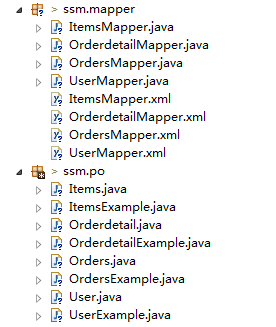
到这里dao层就整合好了,下面来做个测试,整合的时候一定要步步为营,别啪啪啪整合完了再一起测试,到时候出错再找就不太方便了。我们针对ItemsMapper接口中的SelectByPrimaryKey()方法做一个测试:
public class ItemsMapperTest {ApplicationContext applicationContext = null;@Beforepublic void setUp() throws Exception {applicationContext = new ClassPathXmlApplicationContext("classpath:spring/applicationContext-dao.xml");}@Testpublic void testSelectByPrimaryKey() {ItemsMapper itemsMapper = (ItemsMapper) applicationContext.getBean("itemsMapper");Items items = itemsMapper.selectByPrimaryKey(1);System.out.println(items);}
}- 1
- 2
- 3
- 4
- 5
- 6
- 7
- 8
- 9
- 10
- 11
- 12
- 13
- 14
- 15
- 16
能打印出id为1的Items对象说明没有问题。
3.4 一个小插曲
这里需要注意一个问题,刚刚逆向工程生成的代码,我们尽量不要去改动它,为什么呢?比如我现在改动了生成后的代码,后面万一需求改变,我肯定会根据新的表关系再生成一次,然后再拷到自己的工程,这样之前修改的东西就会被覆盖,如果又不想被覆盖,那就很麻烦了……要改的地方就太多了……所以我们永远不去修改生成之后的代码,如果有需要,我们在生成的代码基础上进行扩展(继承,组合等),这样就算代码重新生成,也不会影响我们的扩展类。
我举个例子:假如现在有个需求:
SELECT * FROM items WHERE items.name LIKE ‘%参数%’
这个参数我们要通过一个Items的包装类传进来,Items的包装类指的是,里面封装了Items的信息,还封装了其他信息。因为这个包装类除了查询Items相关信息外,还可能有关联查询,所以里面不仅仅就只有Items本身的信息。
要实现这个需求,我们不能直接去改Items类,不能直接在Items类中添加东西,原因上面已经分析了,我们可以这么做:
- 先写一个Items的继承类
- 在这个继承类上进行扩展
为啥要先写一个继承类呢?直接写Items的扩展类不就行了么?原因还是上面提到的,完以后面这个Items改了咋整?这是一点,还有就是Items的继承类里面,我就可以做一些新的操作了。看一下实现:
//Items的继承类
public class ItemsCustom extends Items {//可以添加商品信息的扩展属性,如果不添加,其实就是Items}- 1
- 2
- 3
- 4
- 5
- 6
//这个就是Items的包装类,我们从service开始,传递下去的都是包装类
public class ItemsQueryVo {//原始的商品信息private Items items;//为了系统 可扩展性,对原始生成的po进行扩展private ItemsCustom itemsCustom;public Items getItems() {return items;}public void setItems(Items items) {this.items = items;}public ItemsCustom getItemsCustom() {return itemsCustom;}public void setItemsCustom(ItemsCustom itemsCustom) {this.itemsCustom = itemsCustom;}
}- 1
- 2
- 3
- 4
- 5
- 6
- 7
- 8
- 9
- 10
- 11
- 12
- 13
- 14
- 15
- 16
- 17
- 18
- 19
- 20
- 21
- 22
- 23
- 24
- 25
然后我们定义itemsMapperCustom.xml映射文件:
<?xml version="1.0" encoding="UTF-8" ?>
<!DOCTYPE mapper PUBLIC "-//mybatis.org//DTD Mapper 3.0//EN" "http://mybatis.org/dtd/mybatis-3-mapper.dtd" >
<mapper namespace="ssm.mapper.ItemsMapperCustom" ><!-- 定义商品查询的sql片段,就是商品查询条件 --><sql id="query_items_where"><!-- 使用动态sql,通过if判断,满足条件进行sql拼接 --><!-- 查询条件通过ItemsQueryVo包装对象中的itemsCustom属性来传递--><if test="itemsCustom != null"><if test="itemsCustom.name != null and itemsCustom.name != ''">items.name LIKE '%${itemsCustom.name}%'</if></if></sql><select id="findItemsList" parameterType="ssm.po.ItemsQueryVo"resultType="ssm.po.ItemsCustom">SELECT items.* FROM items<where><include refid="query_items_where"></include></where></select>
</mapper>- 1
- 2
- 3
- 4
- 5
- 6
- 7
- 8
- 9
- 10
- 11
- 12
- 13
- 14
- 15
- 16
- 17
- 18
- 19
- 20
- 21
- 22
当然咯,对应的mapper接口要定义一下:
public interface ItemsMapperCustom {public List<ItemsCustom> findItemsList(ItemsQueryVo itemsQueryVo) throws Exception;
}- 1
- 2
- 3
- 4
最后针对这个接口写一个测试类:
public class ItemsMapperCustomTest {ApplicationContext applicationContext = null;@Beforepublic void setUp() throws Exception {applicationContext = new ClassPathXmlApplicationContext("classpath:spring/applicationContext-dao.xml");}@Testpublic void testFindItemsList() throws Exception {ItemsMapperCustom itemsMapper = (ItemsMapperCustom) applicationContext.getBean("itemsMapperCustom");ItemsQueryVo itemsQueryVo = new ItemsQueryVo();ItemsCustom itemsCustom = new ItemsCustom();itemsCustom.setName("手机");itemsQueryVo.setItemsCustom(itemsCustom);List<ItemsCustom> itemsCustomList = itemsMapper.findItemsList(itemsQueryVo);System.out.println(itemsCustomList);}}- 1
- 2
- 3
- 4
- 5
- 6
- 7
- 8
- 9
- 10
- 11
- 12
- 13
- 14
- 15
- 16
- 17
- 18
- 19
- 20
- 21
- 22
- 23
- 24
- 25
可以看到,我们操作的都是Items的继承类ItemsCustom和包装类ItemsQueryVo,这个ItemsQueryVo将贯穿整条线,从service调用,到dao层。由逆向工程生成的原始的po类我们不去操作它们,除非是简单的查询,那么直接查即可。
3. 整合service层
先把jar包导了再说,整合service层需要配置事务了,所以要导入spring-aop中所有的jar包到lib中。
之前提到过,service是用来调用mapper的,mapper是用来操作数据库的,其实上面的小插曲中的测试代码就有点类似service层做的事,先获取mapper接口的代理对象,然后操作数据库。所以在service层,我们首先要获取mapper接口的代理对象,只不过在这里我们通过spring注入进来,然后通过这个代理对象去操作数据库。下面看一下整个整合的步骤:
3.1 先写service接口
public interface ItemsService {public List<ItemsCustom> findItemsList(ItemsQueryVo itemsQueryVo) throws Exception;}- 1
- 2
- 3
- 4
- 5
可以看出,这个接口和上面那个mapper接口其实是一样的,当然并不是说一定一样,只不过这里要实现的逻辑都一样而已。
3.2 service实现类
public class ItemsServiceImpl implements ItemsService {@Autowiredprivate ItemsMapperCustom itemsMapperCustom;@Overridepublic List<ItemsCustom> findItemsList(ItemsQueryVo itemsQueryVo)throws Exception {//通过itemsMapperCustom查询数据库return itemsMapperCustom.findItemsList(itemsQueryVo);}}- 1
- 2
- 3
- 4
- 5
- 6
- 7
- 8
- 9
- 10
- 11
- 12
- 13
- 14
可以看出,实现类中是通过@Autowired注入itemsMapperCustom,这个itemsMapperCustom是上面那个插曲中定义的一个mapper。它会通过spring配的扫描器扫描到,并将对象装到spring容器中,然后在这注入进来,然后调用findItemsList方法来操作数据库。至于itemQueyVo,实际中,是将前台传来的数据封装进来,然后传进来的。这样就打通了service与dao之间的通道了。
3.3 配置applicationContext-service.xml
这里是第二个spring的配置文件了,还是在config/spring文件夹下面,主要是用来配置所有的service的,如下:
<?xml version="1.0" encoding="UTF-8"?>
<beans xmlns="http://www.springframework.org/schema/beans"xmlns:xsi="http://www.w3.org/2001/XMLSchema-instance" xmlns:mvc="http://www.springframework.org/schema/mvc"xmlns:context="http://www.springframework.org/schema/context"xmlns:aop="http://www.springframework.org/schema/aop" xmlns:tx="http://www.springframework.org/schema/tx"xsi:schemaLocation="http://www.springframework.org/schema/beanshttp://www.springframework.org/schema/beans/spring-beans-4.2.xsdhttp://www.springframework.org/schema/mvc http://www.springframework.org/schema/mvc/spring-mvc-4.2.xsd http://www.springframework.org/schema/contexthttp://www.springframework.org/schema/context/spring-context.xsdhttp://www.springframework.org/schema/aophttp://www.springframework.org/schema/aop/spring-aop-4.2.xsdhttp://www.springframework.org/schema/txhttp://www.springframework.org/schema/tx/spring-tx.xsd"><!-- 商品管理的service --><bean id="itemsService" class="ssm.service.impl.ItemsServiceImpl"/></beans>- 1
- 2
- 3
- 4
- 5
- 6
- 7
- 8
- 9
- 10
- 11
- 12
- 13
- 14
- 15
- 16
- 17
- 18
- 19
- 20
- 21
- 22
当然咯,如果使用注解的话,这里就不用配了,先用xml的方式吧。
3.4 配置applicationContext-transaction.xml
这里是第三个spring的配置文件了,还是在config/spring文件夹下面,主要是用来配置spring事务管理的,如下:
<?xml version="1.0" encoding="UTF-8"?>
<beans xmlns="http://www.springframework.org/schema/beans"xmlns:xsi="http://www.w3.org/2001/XMLSchema-instance" xmlns:mvc="http://www.springframework.org/schema/mvc"xmlns:context="http://www.springframework.org/schema/context"xmlns:aop="http://www.springframework.org/schema/aop" xmlns:tx="http://www.springframework.org/schema/tx"xsi:schemaLocation="http://www.springframework.org/schema/beanshttp://www.springframework.org/schema/beans/spring-beans-4.2.xsdhttp://www.springframework.org/schema/mvc http://www.springframework.org/schema/mvc/spring-mvc-4.2.xsd http://www.springframework.org/schema/contexthttp://www.springframework.org/schema/context/spring-context.xsdhttp://www.springframework.org/schema/aophttp://www.springframework.org/schema/aop/spring-aop-4.2.xsdhttp://www.springframework.org/schema/txhttp://www.springframework.org/schema/tx/spring-tx.xsd"><!-- 事务管理器 --><!-- 对mybatis操作数据事务控制,spring使用jdbc的事务控制类 --><bean id="transactionManager" class="org.springframework.jdbc.datasource.DataSourceTransactionManager"><!-- 数据源dataSource在applicationContex-dao.xml中配置了 --><property name="dataSource" ref="dataSource"/></bean><!-- 通知 --><tx:advice id="txAdvice" transaction-manager="transactionManager"><tx:attributes><tx:method name="save*" propagation="REQUIRED"/><tx:method name="delete*" propagation="REQUIRED"/><tx:method name="update*" propagation="REQUIRED"/><tx:method name="insert*" propagation="REQUIRED"/><tx:method name="find*" propagation="SUPPORTS" read-only="true"/><tx:method name="get*" propagation="SUPPORTS" read-only="true"/><tx:method name="select*" propagation="SUPPORTS" read-only="true"/></tx:attributes></tx:advice><aop:config><aop:advisor advice-ref="txAdvice" pointcut="execution(* ssm.service.impl.*.*(..))"/></aop:config></beans>- 1
- 2
- 3
- 4
- 5
- 6
- 7
- 8
- 9
- 10
- 11
- 12
- 13
- 14
- 15
- 16
- 17
- 18
- 19
- 20
- 21
- 22
- 23
- 24
- 25
- 26
- 27
- 28
- 29
- 30
- 31
- 32
- 33
- 34
- 35
- 36
- 37
- 38
- 39
- 40
- 41
- 42
- 43
这样service层就整合完了。接下来就是整合springmvc了。
4. 整合springmvc
上面提到过,springmvc是spring的一个模块,所以不需要整合,我们只需要加入springmvc所需的包即可,将springmvc文件夹下的jar包导入到lib中即可。关于springmvc的使用,在前面几篇文章都写了,这里为了完整性,也总结一下。
4.1 配置前端控制器
前端控制器要配置在WEB-INF/web.xml中,如下:
<?xml version="1.0" encoding="UTF-8"?>
<web-app xmlns:xsi="http://www.w3.org/2001/XMLSchema-instance" xmlns="http://java.sun.com/xml/ns/javaee" xsi:schemaLocation="http://java.sun.com/xml/ns/javaee http://java.sun.com/xml/ns/javaee/web-app_3_0.xsd" id="WebApp_ID" version="3.0"><display-name>SpringMVC_Study</display-name><welcome-file-list> <welcome-file>index.jsp</welcome-file></welcome-file-list><!-- 配置前端控制器DispatcherServlet --><servlet><servlet-name>springmvc</servlet-name><servlet-class>org.springframework.web.servlet.DispatcherServlet</servlet-class><init-param><param-name>contextConfigLocation</param-name><param-value>classpath:springmvc.xml</param-value></init-param></servlet><servlet-mapping><servlet-name>springmvc</servlet-name><url-pattern>*.action</url-pattern></servlet-mapping>
</web-app>- 1
- 2
- 3
- 4
- 5
- 6
- 7
- 8
- 9
- 10
- 11
- 12
- 13
- 14
- 15
- 16
- 17
- 18
- 19
- 20
- 21
4.2 配置处理器映射器、处理器适配器和视图解析器
这里使用注解的方式配置,因为注解的方式比较简单。配置在springmvc.xml中
<?xml version="1.0" encoding="UTF-8"?>
<beans xmlns="http://www.springframework.org/schema/beans"xmlns:xsi="http://www.w3.org/2001/XMLSchema-instance" xmlns:mvc="http://www.springframework.org/schema/mvc"xmlns:context="http://www.springframework.org/schema/context"xmlns:aop="http://www.springframework.org/schema/aop" xmlns:tx="http://www.springframework.org/schema/tx"xsi:schemaLocation="http://www.springframework.org/schema/beanshttp://www.springframework.org/schema/beans/spring-beans-4.2.xsdhttp://www.springframework.org/schema/mvc http://www.springframework.org/schema/mvc/spring-mvc-4.2.xsd http://www.springframework.org/schema/contexthttp://www.springframework.org/schema/context/spring-context.xsdhttp://www.springframework.org/schema/aophttp://www.springframework.org/schema/aop/spring-aop-4.2.xsdhttp://www.springframework.org/schema/txhttp://www.springframework.org/schema/tx/spring-tx.xsd"><!-- 一个配置节解决映射器和适配器的配置注解配置 --> <mvc:annotation-driven></mvc:annotation-driven><!-- 扫描所有的Controller --><context:component-scan base-package="ssm.controller"></context:component-scan><!-- 配置视图解析器 进行jsp解析,默认使用jstl标签,classpath下得有jstl的包--><bean class="org.springframework.web.servlet.view.InternalResourceViewResolver" />
</beans>- 1
- 2
- 3
- 4
- 5
- 6
- 7
- 8
- 9
- 10
- 11
- 12
- 13
- 14
- 15
- 16
- 17
- 18
- 19
- 20
- 21
- 22
- 23
- 24
- 25
- 26
- 27
- 28
- 29
4.3 编写Controller(即Handler)
接下来写一个Controller,如下:
@Controller
public class ItemsController {@Autowiredprivate ItemsService itemsService;@RequestMapping("/queryItems")public ModelAndView queryItems() throws Exception {//调用service查找数据库,查询商品列表//这里传入进去一个null表示没有附加条件,查询所有的。因为service中接收的是一个ItemsQueryVo对象List<ItemsCustom> itemsList = itemsService.findItemsList(null);//返回ModelAndViewModelAndView modelAndView = new ModelAndView();modelAndView.addObject("itemsList", itemsList);modelAndView.setViewName("/WEB-INF/jsp/items/itemsList.jsp");return modelAndView;}
}- 1
- 2
- 3
- 4
- 5
- 6
- 7
- 8
- 9
- 10
- 11
- 12
- 13
- 14
- 15
- 16
- 17
- 18
- 19
- 20
- 21
前台jsp页面还是第二篇博文中写的那个,没有变,就不写了。最后还有个重要的步骤就是加载spring容器。
4.4 加载spring容器
在web.xml中添加spring容器监听器,加载spring容器:
<!-- 加载spring容器 --><context-param><param-name>contextConfigLocation</param-name><param-value>classpath:spring/applicationContext-*.xml</param-value></context-param><listener><listener-class>org.springframework.web.context.ContextLoaderListener</listener-class></listener>- 1
- 2
- 3
- 4
- 5
- 6
- 7
- 8
到此为止,spring、mybatis和springmvc就整合完了,开启tomcat,然后在浏览器中输入http://localhost:8080/SpringMVC_Study/queryItems.action即可查询出Items表中的信息,说明整合完成。