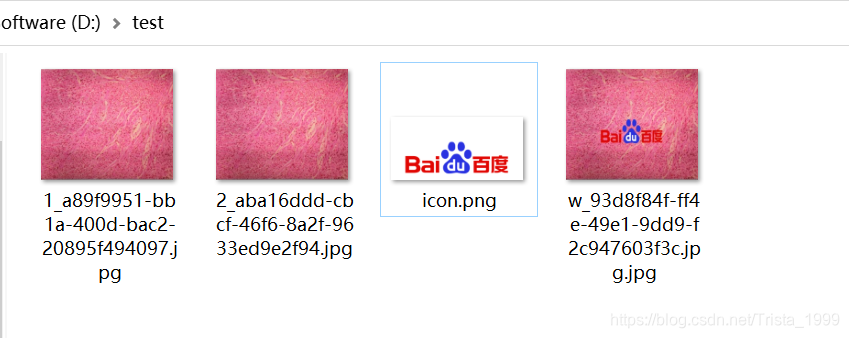
说明
示例代码
package com.utils;import org.apache.commons.io.FileUtils;
import org.apache.commons.lang3.StringUtils;
import org.springframework.web.util.UriUtils;import javax.imageio.ImageIO;
import javax.swing.*;
import java.awt.*;
import java.awt.image.BufferedImage;
import java.io.*;
import java.net.HttpURLConnection;
import java.net.URL;
import java.util.UUID;
public class Test {public static void downloadHttpUrl(String url, String dir, String filename) throws IOException {
URL urlPath = new URL(UriUtils.encodePath(url, "UTF-8"));File file = new File(dir);if (!file.exists()) {file.mkdirs();}FileUtils.copyURLToFile(urlPath, new File(dir + filename));}public static void downLoadFromUrl(String url, String dir, String filename) throws IOException {URL urlPath = new URL(url);HttpURLConnection conn = (HttpURLConnection) urlPath.openConnection();conn.setConnectTimeout(3 * 1000);conn.setRequestProperty("User-Agent", "Mozilla/4.0 (compatible; MSIE 5.0; Windows NT; DigExt)");InputStream inputStream = conn.getInputStream();byte[] getData = readInputStream(inputStream);File saveDir = new File(dir);if (!saveDir.exists()) {saveDir.mkdir();}File file = new File(saveDir + File.separator + filename);FileOutputStream fos = new FileOutputStream(file);fos.write(getData);if (fos != null) {fos.close();}if (inputStream != null) {inputStream.close();}}public static byte[] readInputStream(InputStream inputStream) throws IOException {byte[] buffer = new byte[1024];int len = 0;ByteArrayOutputStream bos = new ByteArrayOutputStream();while ((len = inputStream.read(buffer)) != -1) {bos.write(buffer, 0, len);}bos.close();return bos.toByteArray();}public static void downLoadAndMarkWater(String url, String dir, String filename, String iconPath) {try{HttpURLConnection conn = (HttpURLConnection) new URL(url).openConnection();conn.setReadTimeout(5000);conn.setConnectTimeout(5000);conn.setRequestMethod("GET");String targetPath = dir + filename + ".jpg";if (conn.getResponseCode() == HttpURLConnection.HTTP_OK) {InputStream inputStream = conn.getInputStream();boolean mark = MarkImage.markImageByIcon(iconPath, inputStream, targetPath, null, "jpg");}}catch (Exception e){System.err.println("获取网络图片出现异常,图片路径为:" + url);e.printStackTrace();}}public static boolean markImageByIcon(String iconPath, InputStream srcImage, String targetPath, Integer degree, String formatName) {if (StringUtils.isBlank(iconPath) || StringUtils.isBlank(targetPath) || StringUtils.isBlank(formatName)) {return false;}OutputStream os = null;try {Image srcImg = ImageIO.read(srcImage);BufferedImage buffImg = new BufferedImage(srcImg.getWidth(null), srcImg.getHeight(null), BufferedImage.TYPE_INT_RGB);int srcWidth = srcImg.getWidth(null);int srcHeight = srcImg.getHeight(null);Graphics2D g = buffImg.createGraphics();g.setRenderingHint(RenderingHints.KEY_INTERPOLATION, RenderingHints.VALUE_INTERPOLATION_BILINEAR);g.drawImage(srcImg.getScaledInstance(srcImg.getWidth(null), srcImg.getHeight(null), Image.SCALE_SMOOTH), 0, 0, null);if (null != degree) {g.rotate(Math.toRadians(degree), (double) buffImg.getWidth() / 2, (double) buffImg.getHeight() / 2);}ImageIcon imgIcon = new ImageIcon(iconPath);Image img = imgIcon.getImage();int iconWidth = img.getWidth(null);int iconHeight = img.getHeight(null);double dmarkWidth = srcWidth * 0.9;double dmarkHeight = dmarkWidth * ((double) iconWidth / (double) iconHeight);int imarkWidth = (int) dmarkWidth;int imarkHeight = (int) dmarkHeight;int x = (srcWidth - imarkWidth) / 2;int y = (srcHeight - imarkHeight) / 2;g.drawImage(img, x, y, imarkWidth, imarkHeight, null);g.setComposite(AlphaComposite.getInstance(AlphaComposite.SRC_OVER));g.dispose();os = new FileOutputStream(targetPath);ImageIO.write(buffImg, formatName, os);return true;} catch (Exception e) {e.printStackTrace();} finally {try {if (null != os) {os.close();}} catch (Exception e) {e.printStackTrace();}}return false;}public static void main(String[] args) {
String url ="http://10.0.0.0:8080/image/202106011442318460.jpg";String filename = "1_" + UUID.randomUUID() + ".jpg";String iconPath = "D://test/icon.png";try {Test.downloadHttpUrl(url, "D:/test/", filename);filename = "2_" + UUID.randomUUID() + ".jpg";Test.downLoadFromUrl(url, "D:/test/", filename);filename = "w_" + UUID.randomUUID() + ".jpg";Test.downLoadAndMarkWater(url, "D:/test/", filename, iconPath);} catch (IOException ex) {ex.printStackTrace();}}
}