
根据慕课网的课程做的笔记
条件渲染
条件渲染常用指令:
- v-if、v-else-if、v-else
- v-show
- v-for与v-if结合使用
- v-for高阶用法
v-if用法示例:
<!DOCTYPE html PUBLIC "-//W3C//DTD XHTML 1.0 Transitional//EN" "http://www.w3.org/TR/xhtml1/DTD/xhtml1-transitional.dtd">
<html xmlns="http://www.w3.org/1999/xhtml">
<head><title></title><script src="../scripts/vue.js" type="text/javascript"></script>
</head>
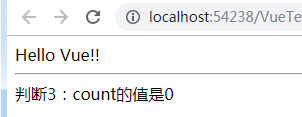
<body><div id="app"><div>{{msg}}</div><hr /><div v-if="count>0">判断1: count大于0,count的值是:{{count}}</div><div v-else-if="count<0&&count>-5">判断2: count的值是{{count}},小于0但大于-5</div><div v-else>判断3:count的值是{{count}}</div></div><script type="text/javascript">var app = new Vue({el: "#app",data: {msg: "Hello Vue!!",count: 0}});</script>
</body>
</html>
当在控制台将count的值改变为大于0的值时,则会输出:
v-show


<!DOCTYPE html PUBLIC "-//W3C//DTD XHTML 1.0 Transitional//EN" "http://www.w3.org/TR/xhtml1/DTD/xhtml1-transitional.dtd">
<html xmlns="http://www.w3.org/1999/xhtml">
<head><title></title><script type="text/javascript" src="../scripts/vue.js"></script>
</head>
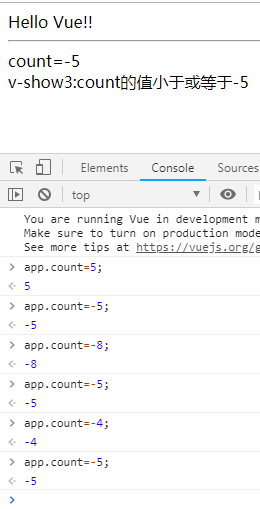
<body><div id="app">{{msg}}<hr />count={{count}}<div v-show="count>0">v-show1:count值大于0</div><!--v-show="count=<0" 这种写法会报错,正确写法为v-show="count<=0"--><div v-show="count<=0&&count>-5">v-show2:count值小于或等于0且大于-5</div><div v-show="count<=-5">v-show3:count的值小于或等于-5</div></div><script type="text/javascript">var app = new Vue({el: "#app",data: {msg:"Hello Vue!!",count:0}});</script>
</body>
</html>
v-if与v-show的区别:v-if是删除或者dom元素,v-show是隐藏或者显示dom元素
列表渲染 v-for
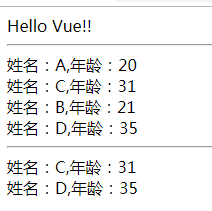
v-for循环,v-for与v-if结合使用:
<!DOCTYPE html PUBLIC "-//W3C//DTD XHTML 1.0 Transitional//EN" "http://www.w3.org/TR/xhtml1/DTD/xhtml1-transitional.dtd">
<html xmlns="http://www.w3.org/1999/xhtml">
<head><title></title><script type="text/javascript" src="../scripts/vue.js"></script>
</head>
<body><div id="app">{{msg}}<hr /><div v-for="item in list">姓名:{{item.name}},年龄:{{item.age}}</div><hr /><div v-for="item in list"><div v-if="item.age>=30">姓名:{{item.name}},年龄:{{item.age}}</div></div></div><script type="text/javascript">var app = new Vue({el: "#app",data: {msg: "Hello Vue!!",list: [{ name: "A", age: 20 }, { name: "C", age: 31 }, { name: "B", age: 21 }, { name: "D", age: 35}]}});</script>
</body>
</html>
Class与Style绑定
Style的绑定
Class的绑定
Class与Style绑定示例源码


<!DOCTYPE html PUBLIC "-//W3C//DTD XHTML 1.0 Transitional//EN" "http://www.w3.org/TR/xhtml1/DTD/xhtml1-transitional.dtd">
<html xmlns="http://www.w3.org/1999/xhtml">
<head><title></title><script type="text/javascript" src="../scripts/vue.js"></script>
</head>
<body><div id="app">{{msg}}<hr /><div v-for="item in list" v-bind:style="styleMsg">姓名:{{item.name}},年龄:{{item.age}}</div><hr /><div v-for="item in list"><div v-if="item.age>=30" :class="['active','add',{'another':item.age==35}]">姓名:{{item.name}},年龄:{{item.age}}</div></div></div><script type="text/javascript">var app = new Vue({el: "#app",data: {msg: "Hello Vue!!",styleMsg:{color:'red','font-style':'italic','font-weight':900},list: [{ name: "A", age: 20 }, { name: "C", age: 31 }, { name: "B", age: 21 }, { name: "D", age: 35}]}});</script>
</body>
</html>