
根据慕课网的课程做的笔记
计算属性与侦听器
- 侦听器:watch
- 计算属性:computed
- 使用场景
侦听器:watch
<!DOCTYPE html PUBLIC "-//W3C//DTD XHTML 1.0 Transitional//EN" "http://www.w3.org/TR/xhtml1/DTD/xhtml1-transitional.dtd">
<html xmlns="http://www.w3.org/1999/xhtml">
<head><title></title><script type="text/javascript" src="../scripts/vue.js"></script>
</head>
<body>
<div id="app">
{{msg}}
</div>
<script>var app=  new Vue({el: "#app",data: {msg: "hello Vue!"},watch: {msg: function (newVal,oldVal) {console.log("最新的值为:" + newVal);console.log("以前的值为:"+oldVal);}},computed: {}});
</script>
</body>
</html>
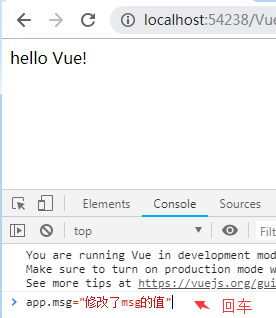

计算属性:computed
<!DOCTYPE html PUBLIC "-//W3C//DTD XHTML 1.0 Transitional//EN" "http://www.w3.org/TR/xhtml1/DTD/xhtml1-transitional.dtd">
<html xmlns="http://www.w3.org/1999/xhtml">
<head><title></title><script type="text/javascript" src="../scripts/vue.js"></script>
</head>
<body>
<div id="app">
{{msg}}
<p>{{msg1}}</p>
</div>
<script>var app = new Vue({el: "#app",data: {msg: "hello Vue!"},watch: {msg: function (newVal, oldVal) {console.log("最新的值为:" + newVal);console.log("以前的值为:" + oldVal);}},computed: {msg1: function () { return 'computed:'+this.msg}}});
</script>
</body>
</html>
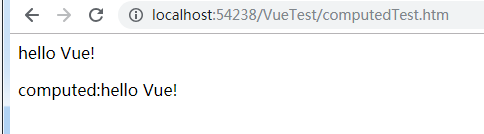

watch与computed区别
<!DOCTYPE html PUBLIC "-//W3C//DTD XHTML 1.0 Transitional//EN" "http://www.w3.org/TR/xhtml1/DTD/xhtml1-transitional.dtd">
<html xmlns="http://www.w3.org/1999/xhtml">
<head><title></title><script type="text/javascript" src="../scripts/vue.js"></script>
</head>
<body><div id="app">{{msg}}<br />count= {{count}}<br />(count+1)*2={{(count+1)*2}}<br />计算属性computed:{{this.msg1}}<br /><button type="button" v-on:click="submit">点击一次,count+1</button></div><script>var app = new Vue({el: "#app",data: {msg: "Hello Vue!!",count: 0},methods: {submit: function () {this.count++;}},watch: {msg: function (newVal, oldVal) {console.log("最新的值为:" + newVal);console.log("以前的值为:" + oldVal);}},computed: {msg1: function () {return "computed:" + this.msg + "--" + this.count;}}});</script>
</body>
</html>
计算属性computed:msg和count是msg1的组成部分,当msg或者count值变化时,都会触发computed中定义的函数,会使msg1改变,而侦听器只是侦听了msg的值的变化,只有msg值变化时,才会触发watch中定义的函数

