
最近在折腾screen内ffmpeg自动启动,但是树莓派不知道为啥运行ffmpeg几乎每次首次运行都会报错
Input/output error,然后第二次运行就能正常工作。所以需要对screen的命令运行结果做一个判断,然后根据返回的内容决定是否再次运行命令。
一、准备工作:
开启screen的log参数
编辑/etc/screenrc文件:
sudo nano /etc/screenrc
末尾添加一行(tips:nano跳转到最后一行快捷键是 ctrl+-然后 ctrl+v)
logfile /tmp/screenlog_%t.log
二、代码
方法一:
#!/usr/bin/env python
# -*- encoding: utf-8 -*-
'''
@File    :   start_ff_cron.py
@Time    :   2020/04/09 18:42:04
@Author  :   SimonLiu
@Version :   1.0
@License :   (C)Copyright @SimonLiu
@Desc    :   None
'''# here put the import lib
import pexpect,os,re,timecount = 0
result = 1
def execshellCmd(cmd):  r = os.popen(cmd)  text = r.read()  r.close()  return text  def start_ffmpeg():#Note: "stuff \\015"代表回车,"stuff \\003" 代表ctrl+csession.sendline('screen -x ffmpeg -p0 -X stuff "ffmpeg -thread_queue_size 4096 -f v4l2  -f lavfi -i \
anullsrc=channel_layout=stereo:sample_rate=44100  -input_format yuyv422 -video_size 1280x720 -framerate 30 \
-i /dev/video0 -vf eq=gamma=1.5:saturation=1.3 -c:v h264_omx -b:v 20480K -vsync 1 -g 16  -f flv\
rtmp://dummy.mydomain.com:1935/live/"')session.sendline('screen -x ffmpeg -p0 -X eval "stuff \\015"')def check_log():global result#读取log文件最后5行cmd = "tail -n 10 /tmp/screenlog_ffmpeg.log"print("executing cmd:%s"%cmd)tailoutput = execshellCmd(cmd)print("tailoutput:%s"%tailoutput)#在读取结果中匹配字符串'output error'pattern1 = "output error"match = re.findall(pattern1, tailoutput)if match:print("match=%s, ffmpeg start failed" %(match[0]))return 1else:print("no error message found in screen log file, ffmpeg start success")return 0#spawn a new bash session
session = pexpect.spawn('/bin/bash')
#导入用户profile
session.sendline('source ~/.bashrc')
#清空旧的log
session.sendline('echo "">/tmp/screenlog_ffmpeg.log')
#dettach模式开启screen(-dmS ffmpeg)并且log文件名参数为ffmpeg(-L -t ffmpeg)
session.sendline('screen -L -t ffmpeg -dmS ffmpeg')while (True):start_ffmpeg()#延时等待执行结果time.sleep(10)if (check_log()):count += 1print('error message found, restart ffmpeg, count:',count)time.sleep(5)continueelse:breaktime.sleep(0.1)session.close()
方法二:
1.安装pexpect模块
pip install pexpect
2.代码如下:
#!/usr/bin/env python
# -*- coding: utf-8 -*-
import pexpect, timeresult = 1
count = 0def start_ffmpeg():#Note: "stuff \\015"代表回车,"stuff \\003" 代表ctrl+csession.sendline('screen -x ffmpeg -p0 -X stuff "ffmpeg -thread_queue_size 4096 -f v4l2  -f lavfi -i \
anullsrc=channel_layout=stereo:sample_rate=44100  -input_format yuyv422 -video_size 1280x720 -framerate 30 \
-i /dev/video0 -vf eq=gamma=1.5:saturation=1.3 -c:v h264_omx -b:v 20480K -vsync 1 -g 16  -f flv\
rtmp://dummy.mydomain.com:1935/live/"')session.sendline('screen -x ffmpeg -p0 -X eval "stuff \\015"')def check_log():global result#读取log文件最后5行session.sendline('tail -n 5 /tmp/screenlog_ffmpeg.log')#在读取结果中匹配字符串'output error'try:result=session.expect([pexpect.TIMEOUT,'output error'])print("result = %d "%result)if (result):return 1else:return 0except:print('--== exception error, set result to 1 ==--')return 1#spawn a new bash session
session = pexpect.spawn('/bin/bash')
#导入用户profile
session.sendline('source ~/.bashrc')
#清空旧的log
session.sendline('echo "">/tmp/screenlog_ffmpeg.log')
#dettach模式开启screen(-dmS ffmpeg)并且log文件名参数为ffmpeg(-L -t ffmpeg)
session.sendline('screen -L -t ffmpeg -dmS ffmpeg')while (True):start_ffmpeg()time.sleep(10)if (check_log()):count += 1print('error message found, restart ffmpeg, count:',count)time.sleep(5)continueelse:print('No error message,ffmpeg running OK')breaktime.sleep(0.1)session.close()
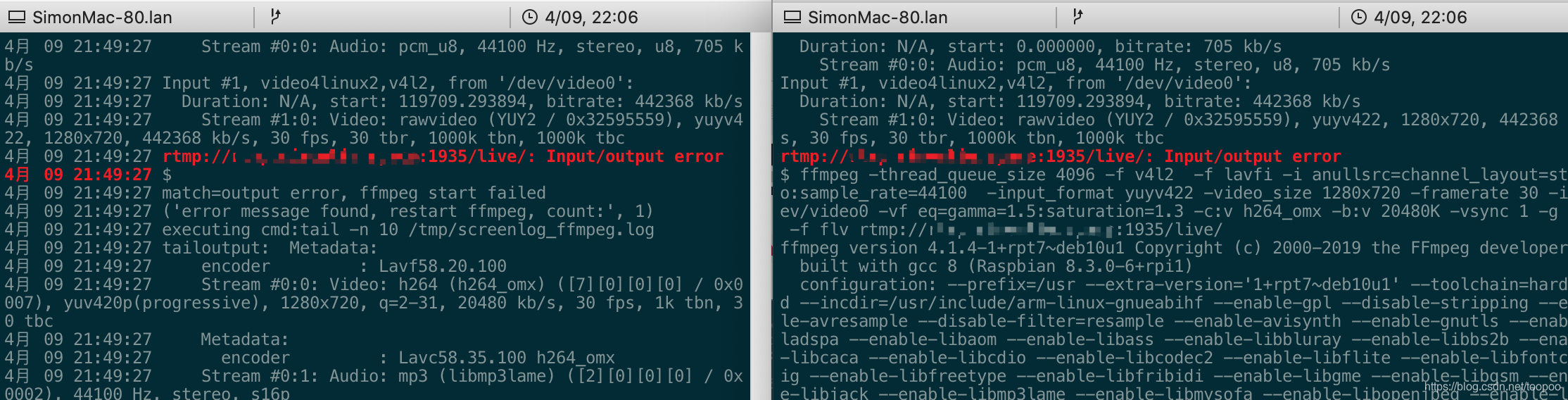
实际运行可以看到/tmp/cron.log和/tmp/screenlog_ffmpeg.log都看到了ffmpeg启动失败的信息然后又再次启动了。
参考文献:
python获取命令行输出结果
linux - Send command to detached screen and get the output - Unix & Linux Stack Exchange
Linux之screen创建、切换、记录屏幕日志 – JeeInn的技术分享
Linux删除(清空)正在运行的应用日志文件内容