
一、最简单底部导航栏
在 app.json 内配置(限制:菜单栏最多5个,样式、图片不好个性化设置)
"tabBar": {"color": "#7A7E83","selectedColor": "#3cc51f","borderStyle": "black","backgroundColor": "#ffffff","list": [{"pagePath": "pages/index/index","iconPath": "/assets/tabBar/icon_component.png","selectedIconPath": "/assets/tabBar/icon_component_HL.png","text": "首页"},{"pagePath": "pages/contact/index","iconPath": "/assets/tabBar/icon_API.png","selectedIconPath": "/assets/tabBar/icon_API_HL.png","text": "联系客服"}]}二、自定义底部导航栏
1、在 app.json 内配置 (custom:最低适配版本2.5.0)
"tabBar": { // 虽然配置后并不生效,但是不能省"custom": true,    // 是否启用自定义底部导航栏"color": "#7A7E83","selectedColor": "#3cc51f","borderStyle": "black","backgroundColor": "#ffffff","list": [{"pagePath": "pages/index/index","iconPath": "/assets/tabBar/icon_component.png","selectedIconPath": "/assets/tabBar/icon_component_HL.png","text": "首页"},{"pagePath": "pages/contact/index","iconPath": "/assets/tabBar/icon_API.png","selectedIconPath": "/assets/tabBar/icon_API_HL.png","text": "联系客服"}]
},"usingComponents": {  // 在 app.json 内开启全局配置"v-tabBar": "custom-tab-bar/index"
}
2、自定义 tabBar 组件 (文件夹名必须为custom-tab-bar,必须和pages在同一级目录;文件名必须为 index 命名)
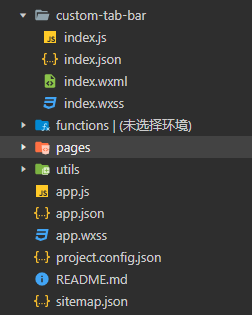
custom-tab-bar 代码请参考:微信小程序api-自定义tabBar
备注: list中的pagePath一定要写绝对路径/pages开头
3、在 pages 的 xxx.js 新增 onShow 方法
onShow: function() {if(typeof this.getTabBar === 'function' && this.getTabBar()){this.getTabBar().setData({selected: 1});}
}参考:微信小程序自定义tabbar
uni-app适配自定义tabBar
说明: 微信小程序自带 tabBar 可以在 <web-view> 标签上显示; 自定义 tabBar 无法在<web-view> 标签上显示【如果将 <view>标签改成<cover-view>标签,则可以在<web-view> 标签上显示,但是tabBar会出现页面加载时无法固定显示在底部的问题】